

v1.35.0Weaviate Embeddings - Multimodal Embeddings
 Weaviate Cloud only
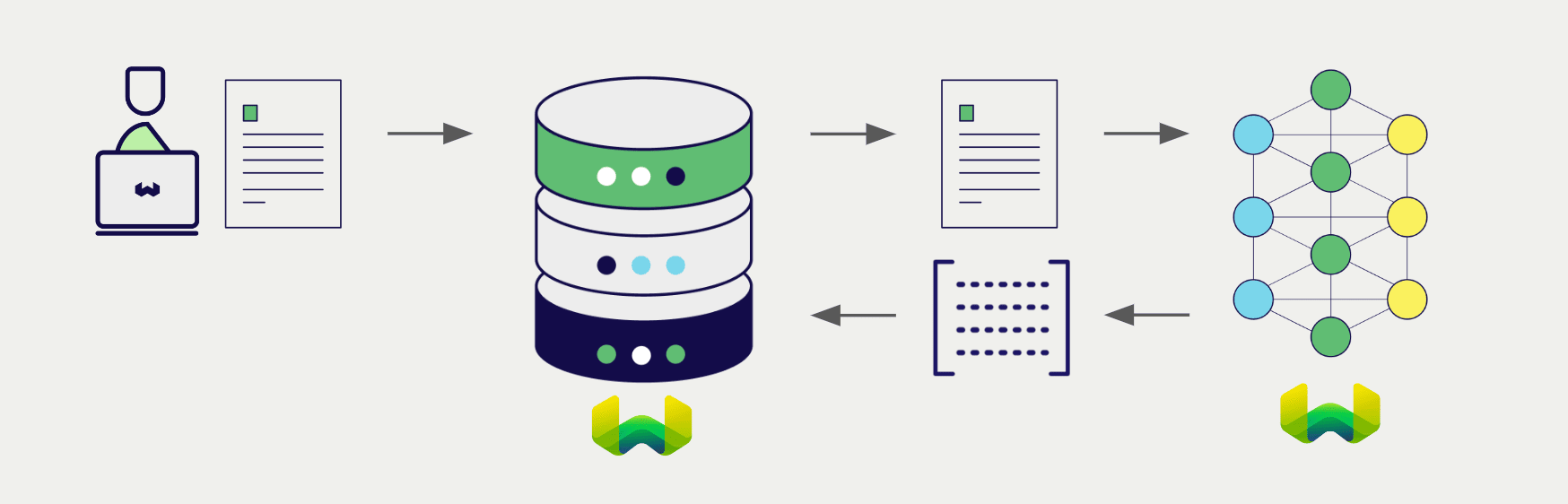
Configure a Weaviate vector index to use a Weaviate Embeddings model, and Weaviate will generate embeddings for various operations using the specified model and your Weaviate API key. This feature is called the vectorizer.
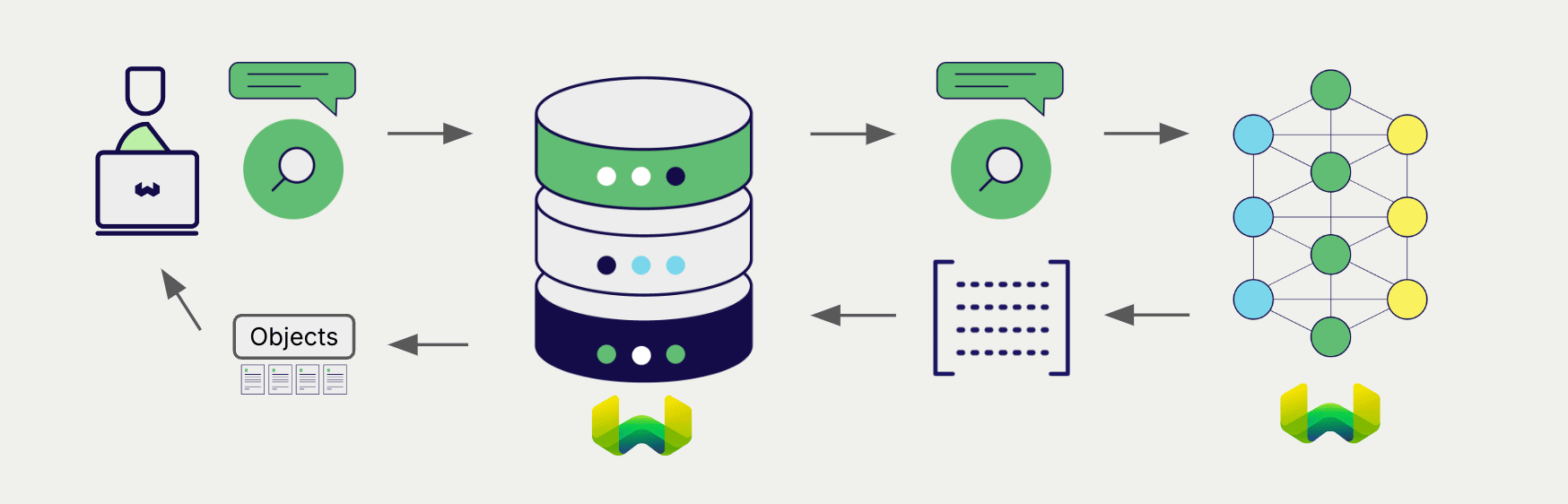
At import time, Weaviate generates image embeddings and saves them into the index. Then at search time, Weaviate converts text queries into embeddings.
This integration is optimized for image-based document retrieval. Embed images of document pages with Weaviate Embeddings' multimodal model, then retrieve relevant pages with text queries.
No OCR or preprocessing required: This model embeds document images directly, eliminating the need for OCR pipelines, text extraction, or other preprocessing steps. Simply convert your documents (PDFs, slides, invoices) to images and embed them as-is.
Requirements
To use Weaviate Embeddings, you need a Weaviate Cloud instance with a Weaviate client library that supports Weaviate Embeddings.
Weaviate Embeddings vectorizers are not available for self-hosted users.
API credentials
Your Weaviate Cloud credentials are automatically used to authorize your access to Weaviate Embeddings.
 API docs
If a snippet doesn't work or you have feedback, please open a GitHub issue.
import weaviate
from weaviate.classes.init import Auth
import os

# Best practice: store your credentials in environment variables
weaviate_url = os.getenv("WEAVIATE_URL")
weaviate_key = os.getenv("WEAVIATE_API_KEY")

client = weaviate.connect_to_weaviate_cloud(
    cluster_url=weaviate_url,                     # Weaviate URL: "REST Endpoint" in Weaviate Cloud console
    auth_credentials=Auth.api_key(weaviate_key),  # Weaviate API key: "ADMIN" API key in Weaviate Cloud console
)

print(client.is_ready())  # Should print: `True`

# Work with Weaviate

client.close()
Configure the vectorizer
Configure a Weaviate index as follows to use a Weaviate Embeddings multimodal model.
Configure one BLOB type property to hold the image data, and pass its name to the vectorizer configuration.
This model produces multi-vector embeddings, which represent each document with multiple vectors for fine-grained semantic matching. To manage memory usage effectively, we recommend enabling MUVERA encoding which compresses the multi-vectors into a single fixed-dimensional vector.
The ColModernVBERT model outputs multi-vector embeddings that can consume significant memory. MUVERA encoding compresses these into efficient single vectors while preserving retrieval quality. For more details on tuning MUVERA parameters, see Multi-vector encodings.
API docsIf a snippet doesn't work or you have feedback, please open a GitHub issue.
from weaviate.classes.config import Configure, Property, DataType

client.collections.create(
    "DemoCollection",
    properties=[
        Property(name="doc_page", data_type=DataType.BLOB),
    ],
    vector_config=[
        Configure.MultiVectors.multi2vec_weaviate(
            # name="document", # Optional: You can choose to name the vector
            image_field="doc_page",
            model="ModernVBERT/colmodernvbert",
            encoding=Configure.VectorIndex.MultiVector.Encoding.muvera(
                # Optional parameters for tuning MUVERA
                ksim=4,
                dprojections=16,
                repetitions=20,
            ),
        )
    ],
)
Basic configuration (without MUVERA)
If you prefer to store the raw multi-vector embeddings without MUVERA compression, use this configuration. Note that this will consume more memory.
API docsIf a snippet doesn't work or you have feedback, please open a GitHub issue.
from weaviate.classes.config import Configure

client.collections.create(
    "DemoCollection",
    properties=[
        Property(name="doc_page", data_type=DataType.BLOB),  # Define an image property
        # Any other properties can be defined here
    ],
    vector_config=[
        Configure.MultiVectors.multi2vec_weaviate(
            name="document",
            image_field="doc_page"  # Must provide the image property name here
        )
    ],
    # Additional parameters not shown
)
Vectorizer parameters
The following parameters are available for the Weaviate Embeddings multimodal vectorizer:
base_url(optional): The base URL for the Weaviate Embeddings service. (Not required in most cases.)model(optional): The name of the model to use for embedding generation. Currently only one model is available.
Data import
After configuring the vectorizer, import data into Weaviate. Weaviate generates embeddings for image objects using the specified model.
API docsIf a snippet doesn't work or you have feedback, please open a GitHub issue.
collection = client.collections.use("DemoCollection")

with collection.batch.fixed_size(batch_size=200) as batch:
    for src_obj in source_objects:
        pages_b64 = url_to_base64(src_obj["page_img_path"])
        weaviate_obj = {
            "title": src_obj["title"],
            "doc_page": pages_b64  # Add the image in base64 encoding
        }

        # The model provider integration will automatically vectorize the object
        batch.add_object(
            properties=weaviate_obj,
            # vector=vector  # Optionally provide a pre-obtained vector
        )
If you already have a compatible model vector available, you can provide it directly to Weaviate. This can be useful if you have already generated embeddings using the same model and want to use them in Weaviate, such as when migrating data from another system.
Searches
Once the vectorizer is configured, Weaviate will perform vector and hybrid search operations using the specified model.
Vector (near text) search
When you perform a vector search, Weaviate converts the text query into an embedding using the specified model and returns the most similar objects from the database.
The query below returns the n most similar objects from the database, set by limit.
API docsIf a snippet doesn't work or you have feedback, please open a GitHub issue.
collection = client.collections.use("DemoCollection")

response = collection.query.near_text(
    query="A holiday film",  # The model provider integration will automatically vectorize the query
    limit=2
)

for obj in response.objects:
    print(obj.properties["title"])
Hybrid search
A hybrid search performs a vector search and a keyword (BM25) search, before combining the results to return the best matching objects from the database.
When you perform a hybrid search, Weaviate converts the text query into an embedding using the specified model and returns the best scoring objects from the database.
The query below returns the n best scoring objects from the database, set by limit.
API docsIf a snippet doesn't work or you have feedback, please open a GitHub issue.
collection = client.collections.use("DemoCollection")

response = collection.query.hybrid(
    query="A holiday film",  # The model provider integration will automatically vectorize the query
    limit=2
)

for obj in response.objects:
    print(obj.properties["title"])
Available models
ModernVBERT/colmodernvbert
- A 250M parameter late-interaction vision-language encoder, fine-tuned for visual document retrieval tasks.
- Generates multi-vector embeddings (ColBERT-style late-interaction) from document images and text queries.
- Ideal for getting documents directly into Weaviate without heavy preprocessing - no OCR or text extraction required.
- State-of-the-art performance in its size class, matching models up to 10x larger.
- Query token limit: 8,092 tokens
- Read more at the Hugging Face model card
- For integration details, see Weaviate Embeddings: Multimodal
Enable MUVERA encoding to reduce memory usage while preserving retrieval quality.
Further resources
Code examples
Once the integrations are configured at the collection, the data management and search operations in Weaviate work identically to any other collection. See the following model-agnostic examples:
- The How-to: Manage collections and How-to: Manage objects guides show how to perform data operations (i.e. create, read, update, delete collections and objects within them).
- The How-to: Query & Search guides show how to perform search operations (i.e. vector, keyword, hybrid) as well as retrieval augmented generation.
Multi-vector embeddings
- Multi-vector encodings (MUVERA): Learn how to configure MUVERA parameters to balance memory usage and retrieval accuracy.
- Define multi-vector embeddings: Configure multi-vector embeddings in your collection.
References
- Weaviate Embeddings Documentation
- Weaviate Embeddings Models
Pricing
Weaviate Embeddings models are charged based on token usage. For more pricing information, see the Weaviate Cloud pricing page.
Questions and feedback
If you have any questions or feedback, let us know in the user forum.