

Engram
Engram is a memory server for LLM agents and applications. It provides a REST API and Python SDK that automatically extracts, transforms, and stores memories using vector embeddings and LLM-powered processing.
Use Engram to give your agents persistent memory that they can write to and search across conversations, users, and topics.
Key capabilities
- Automatic memory extraction — Send raw text, pre-extracted facts, or full conversations. Engram's pipeline extracts and stores structured memories automatically.
- Semantic search — Find relevant memories using vector similarity, BM25 keyword search, or hybrid retrieval.
- Scoped memory — Isolate memories by project, user, and any custom scope properties (e.g.
conversation_id). Topics let you categorize memories within a group. - Async processing — Memory storage runs asynchronously through a pipeline. Poll run status to track when memories are committed.
How it works
Below is an overview of Engram's architecture and information flow:
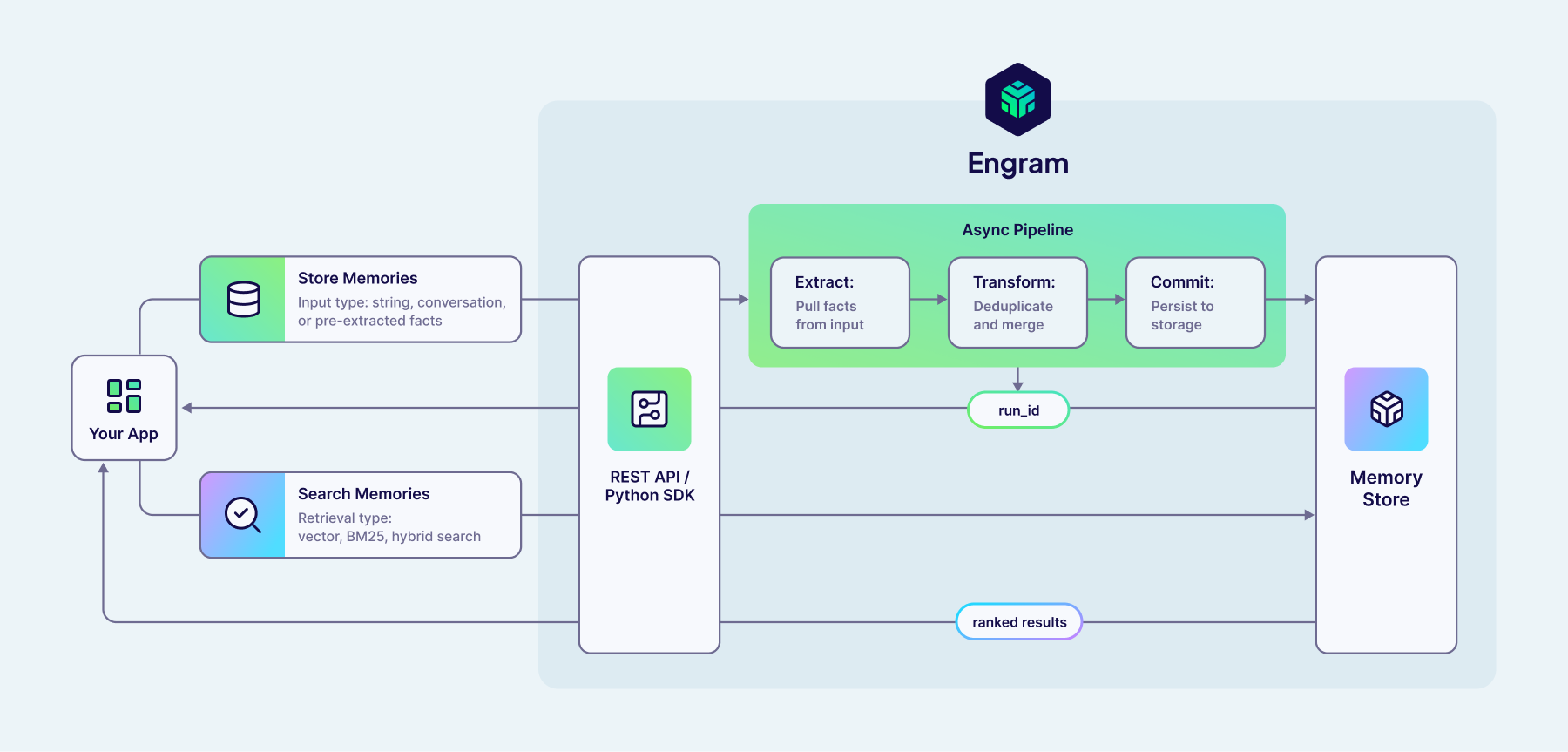
Your app communicates with Engram through the REST API or Python SDK.
Storing memories: You send content (text, a conversation, or pre-extracted facts) to the API. Engram immediately returns a run_id and processes the content asynchronously through a pipeline:
- Extract — Pull individual facts from the input.
- Transform — Deduplicate and merge with existing memories.
- Commit — Persist the results to the memory store.
You can poll the run_id to check when processing is complete.
Searching memories: You send a query to the API with a retrieval type (vector, BM25, or hybrid). Engram searches the memory store and returns ranked results.
Get started
- Quickstart — Create a project, get an API key, store your first memory, and search it.
- Concepts — Understand memories, topics, groups, scoping, and pipelines.
- Guides — Step-by-step instructions for storing, searching, and managing memories.
- REST API reference — Full endpoint documentation with request and response schemas.
Questions and feedback
Have a question or feedback? Here's how to reach us.