

Introduction
 Weaviate Cloud only
The Query Agent runs agentic search over your Weaviate Cloud database. Ask a question in natural language and the agent automatically decides which collections to search, which filters and sorts to apply, and which search types to use — all in a single call.
Up to 250 ask queries or 1000 search queries per month, no credit card required. Get started →

from weaviate.agents.query import QueryAgent

qa = QueryAgent(
    client=client, # your Weaviate cloud client
    collections=["FinancialContracts"]
)

res = qa.ask("Find all contracts signed in 2025")

res.display()
Engram is a managed memory service that gives your agents persistent, searchable memory across conversations and users.
How the Query Agent works
Example output
╭───────────────────────────────────────────── 💬 Ask Mode Response ──────────────────────────────────────────────╮
│ │
│ The most expensive blue t-shirt is **Neotech Noir Tee** by **Vivid Verse**, priced at **$46.00**. │
│ │
│ Details: │
│ - **Product ID:** 9f9fe575-be97-46d9-a5ca-ff41ae57bef4 │
│ - **Colors:** black, blue │
│ - **Category:** Tops │
│ - **Subcategory:** T-Shirts │
│ │
╰─────────────────────────────────────────────────────────────────────────────────────────────────────────────────╯
╭───────────────────────────────────────────────── 🔭 Search 1/1 ─────────────────────────────────────────────────╮
│ │
│ QueryResultWithCollectionNormalized( │
│ query=None, │
│ filters=FilterAndOr( │
│ combine='AND', │
│ filters=[ │
│ TextPropertyFilter( │
│ property_name='subcategory', │
│ operator=<ComparisonOperator.EQUALS: '='>, │
│ value='T-Shirts' │
│ ), │
│ TextArrayPropertyFilter( │
│ property_name='colors', │
│ operator=<ComparisonOperator.CONTAINS_ANY: 'contains_any'>, │
│ value=['blue'] │
│ ) │
│ ] │
│ ), │
│ collection='ECommerce', │
│ sort_property=QuerySort(property_name='price', order='descending', tie_break=None), │
│ uuid_value=None │
│ ) │
│ │
╰─────────────────────────────────────────────────────────────────────────────────────────────────────────────────╯
╭────────────────────────────────────────────── 📊 Aggregation 1/1 ───────────────────────────────────────────────╮
│ │
│ AggregationResultWithCollectionNormalized( │
│ groupby_property=None, │
│ aggregation=IntegerPropertyAggregation(property_name='price', metrics=<NumericMetrics.MAX: 'MAXIMUM'>), │
│ filters=FilterAndOr( │
│ combine='AND', │
│ filters=[ │
│ TextPropertyFilter( │
│ property_name='category', │
│ operator=<ComparisonOperator.EQUALS: '='>, │
│ value='Tops' │
│ ), │
│ TextPropertyFilter( │
│ property_name='subcategory', │
│ operator=<ComparisonOperator.EQUALS: '='>, │
│ value='T-Shirts' │
│ ), │
│ TextArrayPropertyFilter( │
│ property_name='colors', │
│ operator=<ComparisonOperator.CONTAINS_ANY: 'contains_any'>, │
│ value=['blue'] │
│ ) │
│ ] │
│ ), │
│ collection='ECommerce' │
│ ) │
│ │
╰─────────────────────────────────────────────────────────────────────────────────────────────────────────────────╯
What is the Query Agent?
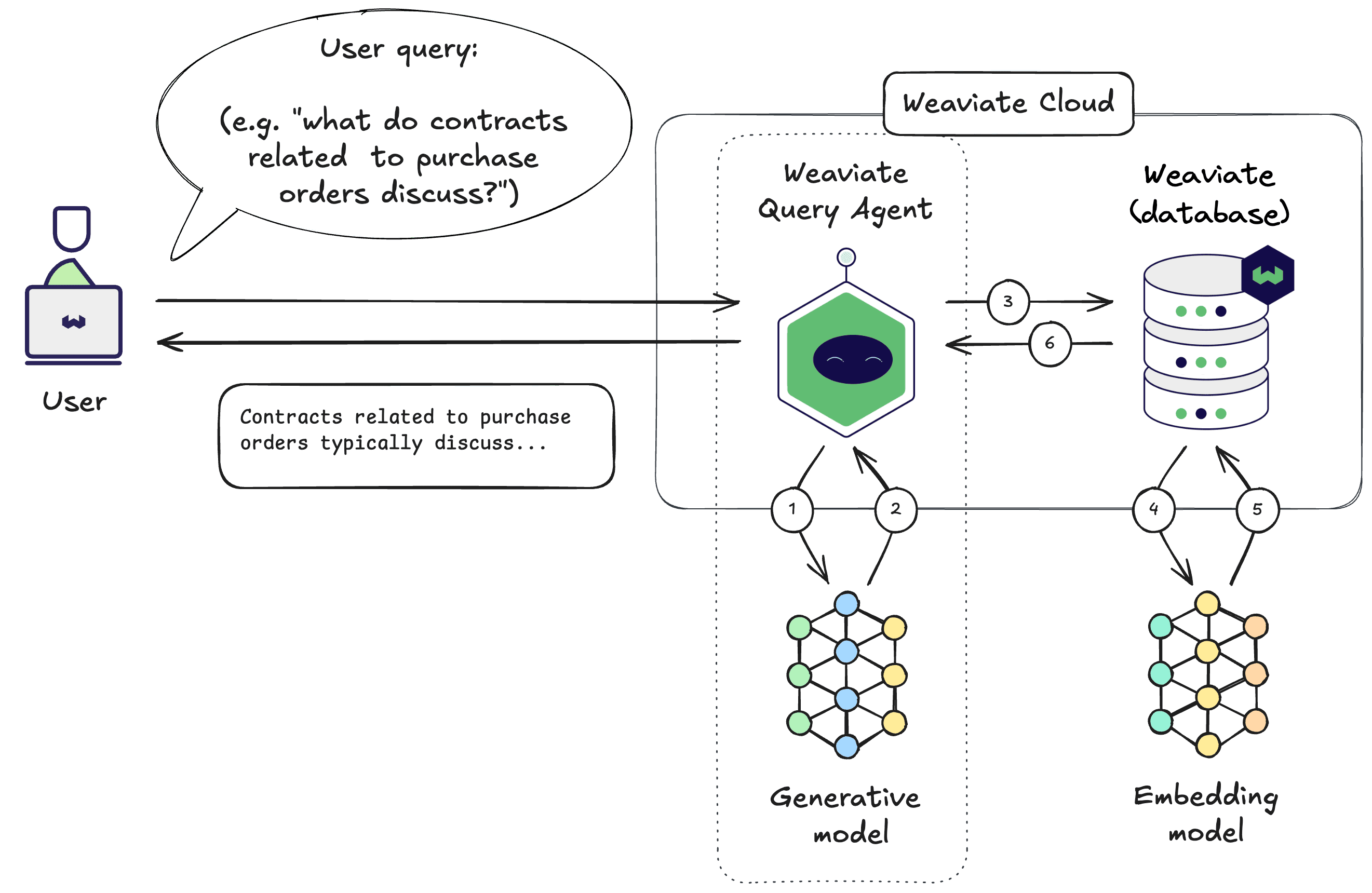
The Weaviate Query Agent connects to your pre-existing Weaviate database and transforms natural language queries into actionable searches using an LLM. It can perform multiple searches and aggregations across one or more collections, dynamically deciding which collection(s) to search on, creating custom filters, group bys, sorts, and search types, all depending on a single natural language question.
It is designed as a pre-built agentic service for your data, with two main modes:
- Ask Mode: Return a natural language answer after searching your data. Chat-like; best for end-user-facing apps where the user wants a written response instead of raw data.
- Search Mode: Return the raw matching objects directly from your collection(s), with filters, sorts, and search types chosen for you. Lookup-like; best for internal search, dashboards, or the retrieval step in a larger pipeline.
Example use cases
- Customer-facing chat assistant (Ask Mode) — Answer questions like "Recommend me vintage shoes under $70 in size 9" with a written response, sourced from your product catalog.
- Natural-language filter on an internal dashboard (Search Mode) — Turn "orders flagged last week from EU customers" into a filtered Weaviate query and render the rows in your UI.
- Retrieval step inside your own RAG or agent stack (Search Mode) — Fetch the most relevant objects via the agent, then pass them to a downstream generative step you control.
Get started
You need a Weaviate Cloud cluster — the free tier is free forever. With a cluster and some data, install the Python or TypeScript client and you can run your first query in minutes. To query your data from an AI assistant or agent instead, connect it to the Query Agent MCP server.
Already have a cluster but no data? Upload via CSV in the cloud console, or via the Weaviate APIs.
Further resources
- Quickstart — Set up the client and run your first ask and search calls.
- Modes — Detailed pages on Ask Mode, Search Mode, and other modes.
- Configuration — Constructor options, collection configuration, additional filters, system prompts, and conversational inputs.
- Recipes — End-to-end example notebooks.
Questions and feedback
Have a question or feedback? Here's how to reach us.