

Default cluster settings
This page describes the default configuration settings applied to Weaviate Cloud clusters. These settings control various aspects of your cluster's behavior, including database limits, authentication, backups, and usage metrics.
The majority of these settings are configured via environment variables. For more details on each environment variable, refer to the environment variable pages in the Deployment section of our documentation.
Weaviate Database settings
These settings control core database functionality and limits. User configurable settings can be viewed and updated under Advanced configuration on the cluster Dashboard.
| Setting | Requires restart | Default value | User configurable |
|---|---|---|---|
MAXIMUM_ALLOWED_COLLECTIONS_COUNT | No | 1000 on paid plans. The free tier allowance is 1 collection. | No |
AUTOSCHEMA_ENABLED | No | true | Yes |
MCP_SERVER_ENABLED | No | true (always enabled on Weaviate Cloud) | No |
Enable MCP Read-Only (console setting) | No | false | Yes (see Weaviate MCP server) |
ASYNC_REPLICATION_DISABLED | No | false | No |
ASYNC_INDEXING | Yes | true | No |
DEFAULT_QUANTIZATION | No | Set by the cluster's optimization profile | Yes (via the optimization profile) |
DEFAULT_VECTOR_INDEX | No | Set by the cluster's optimization profile | Yes (via the optimization profile) |
DISABLE_GRAPHQL | No | true (new clusters) | No |
CORS_ALLOW_ORIGIN | Yes | https://console.weaviate.cloud | Yes (to allow any) |
REPLICATION_MINIMUM_FACTOR | Yes | 3 (for HA clusters) | No |
The user configurable settings appear as toggles in the Advanced configuration section of the cluster Dashboard: Enable MCP Read-Only, Enable auto schema generation, and Allow all CORS origins.
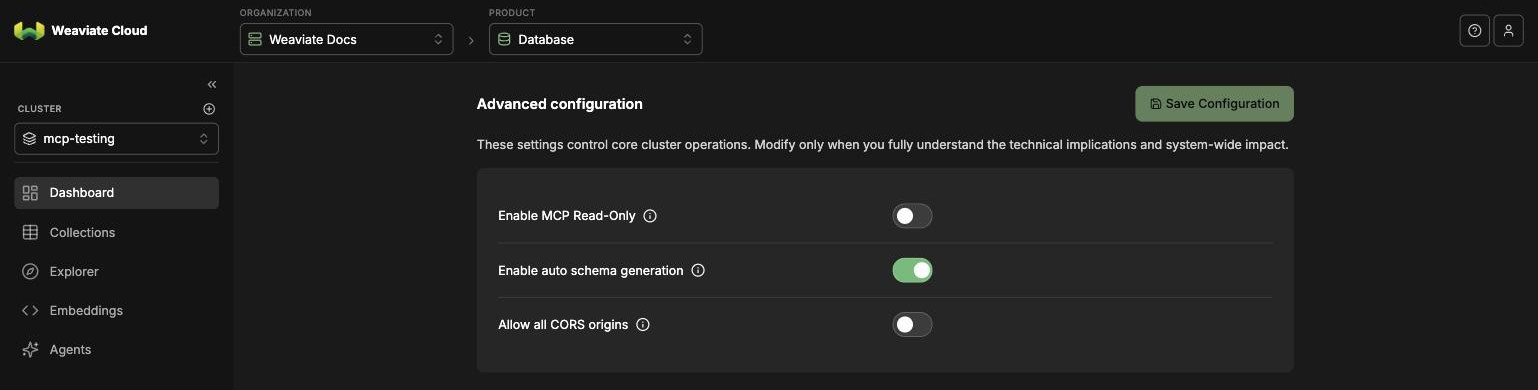
Advanced configuration on the cluster
Dashboard. Select Save Configuration to apply
your changes; the CORS setting takes effect after a cluster restart.
The Optimization profile and the cluster details (Weaviate Database version, cloud provider, cloud region, product, and deployment) are further down the same Dashboard page. On a free cluster, Cost Optimized is the current profile and Performance Optimized is available for Shared.
DEFAULT_VECTOR_INDEX and DEFAULT_QUANTIZATION are not set directly. They are determined by the optimization profile you pick when you create the cluster: the Cost Optimized profile defaults to the HFresh vector index with automatic compression, and the Performance Optimized profile defaults to HNSW with RQ. Index type and compression are enforced on the free tier, which uses Cost Optimized. Upgrade to Shared to choose your own profile.
The profile only sets the default for new collections. An explicit vector index in a collection definition always takes precedence.
The MCP server is always enabled on Weaviate Cloud clusters. Enable MCP Read-Only is a console setting with no matching environment variable: it drives the mcp_server_write_access_enabled runtime override (inverted — switch on means write access off), so changes apply without a restart. The switch is off by default on all cluster types, which means the write tool is available by default. See Weaviate MCP server.
User management & permissions
These settings control authentication and authorization for your cluster. These settings are not user configurable.
| Setting | Default value |
|---|---|
AUTHORIZATION_RBAC_ENABLED | true |
AUTHENTICATION_DB_USERS_ENABLED | true |
AUTHENTICATION_OIDC_ENABLED | true |
For more information on authentication and authorization, see:
Backups
Each Weaviate Cloud instance is automatically backed up daily by default. Additional backups can be triggered manually via the API.
Backups are retained per the applicable backup retention period of that cluster, such as 7 days for Flex Shared Cloud clusters.
To restore a backup, contact Weaviate Cloud support.
Query settings
These settings control default query behavior.
| Setting | Default value |
|---|---|
QUERY_DEFAULTS_LIMIT | 10 |
QUERY_MAXIMUM_RESULTS | 100000 |
Modules
Weaviate Cloud clusters do not have a default vectorizer module configured. To use vector search, configure a vector when you create a collection. Specify a vectorizer integration, or configure a vector for your own embeddings (for example self_provided) and import them.
To view the list of enabled modules on your cluster, see Cluster Status: Enabled Modules.
Support
If you use Weaviate Cloud (Database cluster(s) or Weaviate product in the cloud) or have a self-hosted support package, open a ticket in the Support Portal or email Weaviate support directly. To add a support plan, contact Weaviate sales.
Use the Support Portal for direct help from the Weaviate team: open and track tickets, and we'll respond in line with your support plan. The Community Forum is open to everyone, and a great place to ask questions, get help with your cluster, and connect with other developers. For all the ways to get help, see the Support overview.