

Build a Query Agent e-commerce assistant
In this recipe, we will be building a simple e-commerce assistant agent with the Weaviate Query Agent. This agent will have access to a number of Weaviate collections, and will be capable of answering complex queries about brands and clothing items, accessing information from each collection. By the end, we'll wrap the agent in a small reusable class that's ready to plug into a chatbot, CLI, or any larger application.


📚 You can read and learn more about this service in our "Introducing the Weaviate Query Agent" blog.
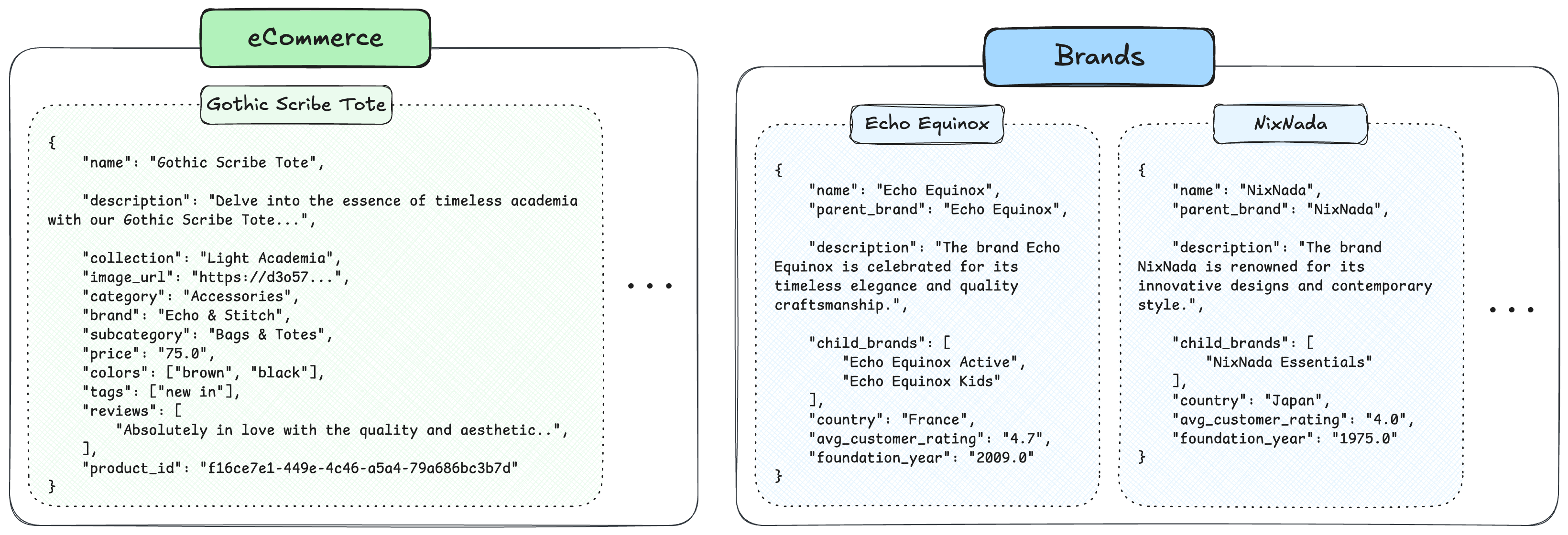
To get started, we've prepared two open datasets, available on Hugging Face. The first step will be walking through how to populate your Weaviate Cloud collections.
- E-commerce: A dataset that lists clothing items, prices, brands, reviews, etc.
- Brands: A dataset that lists clothing brands and information about them such as their parent brand, child brands, average customer rating, etc.
💡 New to the Query Agent? Start with the Get Started recipe — it walks through Ask Mode, Search Mode and Suggest Queries at a higher level before diving into this use-case-focused tutorial.
1. Setting up Weaviate & importing data
To use the Weaviate Query Agent, first, create a Weaviate Cloud account👇
- Create a Weaviate Cloud account and set up a free cluster
- Go to 'Embedding' and enable it, by default, this will make it so that we use
Snowflake/snowflake-arctic-embed-l-v2.0as the embedding model - Take note of the
WEAVIATE_URLandWEAVIATE_API_KEYto connect to your cluster below
Info: We recommend using Weaviate Embeddings so you do not have to provide any extra keys for external embedding providers.
!pip install "weaviate-client[agents]" datasets
import os
from getpass import getpass

if "WEAVIATE_API_KEY" not in os.environ:
  os.environ["WEAVIATE_API_KEY"] = getpass("Weaviate API Key")
if "WEAVIATE_URL" not in os.environ:
  os.environ["WEAVIATE_URL"] = getpass("Weaviate URL")

import weaviate
from weaviate.classes.init import Auth

client = weaviate.connect_to_weaviate_cloud(
    cluster_url=os.environ.get("WEAVIATE_URL"),
    auth_credentials=Auth.api_key(os.environ.get("WEAVIATE_API_KEY")),
)
Prepare the collections
In the following code blocks, we are pulling our demo datasets from Hugging Face and writing them to new collections in our Weaviate Cloud cluster.
❗️ The
QueryAgentuses the descriptions of collections and properties to decide which ones to use when solving queries, and to access more information about properties. You can experiment with changing these descriptions, providing more detail, and more. It's good practice to provide property descriptions too. For example, below we make sure that theQueryAgentknows that prices are all in USD, which is information that would otherwise be unavailable.
from weaviate.classes.config import Configure, Property, DataType

client.collections.create(
    "Brands",
    description="A dataset that lists information about clothing brands, their parent companies, average rating and more.",
    vector_config=Configure.Vectors.text2vec_weaviate()
)

client.collections.create(
    "ECommerce",
    description="A dataset that lists clothing items, their brands, prices, and more.",
    vector_config=Configure.Vectors.text2vec_weaviate(),
    properties=[
        Property(name="collection", data_type=DataType.TEXT),
        Property(name="category", data_type=DataType.TEXT),
        Property(name="tags", data_type=DataType.TEXT_ARRAY),
        Property(name="subcategory", data_type=DataType.TEXT),
        Property(name="name", data_type=DataType.TEXT),
        Property(name="description", data_type=DataType.TEXT),
        Property(name="brand", data_type=DataType.TEXT),
        Property(name="product_id", data_type=DataType.UUID),
        Property(name="colors", data_type=DataType.TEXT_ARRAY),
        Property(name="reviews", data_type=DataType.TEXT_ARRAY),
        Property(name="image_url", data_type=DataType.TEXT),
        Property(name="price", data_type=DataType.NUMBER, description="price of item in USD"),
    ]
)
from datasets import load_dataset

brands_dataset = load_dataset("weaviate/agents", "query-agent-brands", split="train", streaming=True)
ecommerce_dataset = load_dataset("weaviate/agents", "query-agent-ecommerce", split="train", streaming=True)

brands_collection = client.collections.use("Brands")
ecommerce_collection = client.collections.use("ECommerce")

with brands_collection.batch.dynamic() as batch:
    for item in brands_dataset:
        batch.add_object(properties=item["properties"])

with ecommerce_collection.batch.dynamic() as batch:
    for item in ecommerce_dataset:
        batch.add_object(properties=item["properties"])
2. Set up the Query Agent
When setting up the Query Agent, we have to provide it a few things:
- The
client - The
collectionswhich we want the agent to have access to. - (Optionally) A
system_promptthat describes how our agent should behave - (Optionally) Timeout - which for now defaults to 60s.
Let's start with a simple agent. Here, we're creating an agent that has access to our Brands & ECommerce datasets, and frame it as a helpful shopping assistant via the system prompt.
from weaviate.agents.query import QueryAgent

agent = QueryAgent(
    client=client,
    collections=["ECommerce", "Brands"],
    system_prompt=(
        "You are a friendly e-commerce shopping assistant. "
        "Help the user find products from the catalog, compare options, and answer questions about brands. "
        "Recommend specific items with their names, brands and prices, and explain why they match the user's request."
    ),
)
3. Run the Query Agent
When we run the agent, it will first make a few decisions, depending on the query:
- The agent will decide which collection or collections to look up an answer in.
- The agent will also decide whether to perform a regular search query, what filters to use, whether to do an aggregation query, or all of them together!
- It will then provide a response, accessible via
response.final_answer,response.sources, or by callingresponse.display()for a rich formatted view.
Ask a question
Let's start with a simple question: "I like the vintage clothes, can you list me some options that are less than $200?"
We can then also inspect how the agent responded, what kind of searches it performed on which collections, whether it has identified if the final answer is missing information or not, as well as the final answer 👇
response = agent.ask("I like the vintage clothes, can you list me some options that are less than $200?")
response.display()
╭─────────────────────────────────────────────── 🔍 Original Query ───────────────────────────────────────────────╮
│                                                                                                                 │
│ I like the vintage clothes, can you list me some options that are less than $200?                               │
│                                                                                                                 │
╰─────────────────────────────────────────────────────────────────────────────────────────────────────────────────╯
╭──────────────────────────────────────────────── 📝 Final Answer ────────────────────────────────────────────────╮
│                                                                                                                 │
│ If you are looking for vintage clothing options under $200, here are some great choices:                        │
│                                                                                                                 │
│ 1. Vintage Philosopher Midi Dress - Priced at $125, this dress from Echo & Stitch embraces a classic        │
│ scholarly look with its deep green velvet fabric and antique gold detailing. It's tailored for elegance and is  │
│ ideal for sophisticated occasions.                                                                              │
│                                                                                                                 │
│ 2. Vintage Gale Pleated Dress - This $120 dress from Solemn Chic features deep burgundy pleats and          │
│ vintage-inspired sleeve details, perfect for a timeless scholarly appearance.                                   │
│                                                                                                                 │
│ 3. Retro Groove Flared Pants - For $59, these electric blue flared pants from Vivid Verse bring back the    │
│ playful spirit of the early 2000s with a modern touch.                                                          │
│                                                                                                                 │
│ 4. Vintage Scholar Tote - At $90, this tote from Echo & Stitch combines functionality and elegance, ideal   │
│ for everyday use, especially if you enjoy a scholarly aesthetic.                                                │
│                                                                                                                 │
│ 5. Electric Velvet Trousers - Priced at $60, these neon green velvet trousers from Vivid Verse offer a fun, │
│ throwback vibe to early Y2K fashion.                                                                            │
│                                                                                                                 │
│ 6. Victorian Velvet Jumpsuit - For $120, this jumpsuit from Solemn Chic offers an elegant blend of romance  │
│ and scholarly charm, suited for library visits or cultured gatherings.                                          │
│                                                                                                                 │
│ 7. Vintage Scholar Turtleneck - This $55 turtleneck from Echo & Stitch suits the Dark Academia vibe,        │
│ perfect for layering or wearing alone.                                                                          │
│                                                                                                                 │
│ 8. Vintage Ivy Loafers - These $120 loafers from Solemn Chic offer timeless sophistication, with a deep     │
│ burgundy finish that complements any vintage wardrobe.                                                          │
│                                                                                                                 │
│ These options cater to various preferences, from dresses and jumpsuits to pants and accessories, all capturing  │
│ the vintage essence at an affordable price.                                                                     │
│                                                                                                                 │
╰─────────────────────────────────────────────────────────────────────────────────────────────────────────────────╯
╭─────────────────────────────────────────── 🔭 Searches Executed 1/1 ────────────────────────────────────────────╮
│                                                                                                                 │
│ QueryResultWithCollectionNormalized(                                                                            │
│     query='vintage clothes',                                                                                    │
│     filters=IntegerPropertyFilter(                                                                              │
│         property_name='price',                                                                                  │
│         operator=<ComparisonOperator.LESS_THAN: '<'>,                                                           │
│         value=200.0                                                                                             │
│     ),                                                                                                          │
│     collection='ECommerce'                                                                                      │
│ )                                                                                                               │
│                                                                                                                 │
╰─────────────────────────────────────────────────────────────────────────────────────────────────────────────────╯
Ask a follow-up question
Customers rarely ask one question and stop — they have a conversation. To give the agent the prior turns, pass a list of ChatMessage objects to .ask() instead of a single string. The agent will then use the full message history as context.
from weaviate.agents.classes import ChatMessage

conversation = [
    ChatMessage(role="user", content="I like the vintage clothes, can you list me some options that are less than $200?"),
    ChatMessage(role="assistant", content=response.final_answer),
    ChatMessage(role="user", content="What about some nice shoes, same budget as before?"),
]

new_response = agent.ask(conversation)
new_response.display()
╭──────────────────────────────────────────────── 📝 Final Answer ────────────────────────────────────────────────╮
│                                                                                                                 │
│ Here are some great shoe options under $200 that you might like:                                                │
│                                                                                                                 │
│ 1. Vintage Noir Loafers - Priced at $125, these loafers are part of the Dark Academia collection by Solemn  │
│ Chic. They come in black and grey, featuring a classic design with a modern twist. Reviews highlight their      │
│ comfort and stylish appearance, making them suitable for both casual and formal settings.                       │
│                                                                                                                 │
│ 2. Parchment Boots - At $145, these boots from Nova Nest's Light Academia collection are noted for their    │
│ elegant ivory leather and classical detail stitching. They are praised for their comfort and versatile style.   │
│                                                                                                                 │
│ 3. Bramble Berry Loafers - These loafers, priced at $75, come in pink and green and are marked by their     │
│ eco-friendly material and countryside aesthetic. Produced by Eko & Stitch, they are loved for their comfort and │
│ sustainability.                                                                                                 │
│                                                                                                                 │
│ 4. Glide Platforms - Available for $90 from the Y2K collection by Vivid Verse, these platform sneakers are  │
│ both comfortable and stylish with a high-shine pink finish.                                                     │
│                                                                                                                 │
│ 5. Sky Shimmer Sneaks - Costing $69, these sneakers are from the Y2K collection by Nova Nest and offer a    │
│ comfortable fit with a touch of sparkle for style.                                                              │
│                                                                                                                 │
│ These selections offer a mix of formal and casual styles, ensuring you can find a perfect pair under your       │
│ budget of $200.                                                                                                 │
│                                                                                                                 │
╰─────────────────────────────────────────────────────────────────────────────────────────────────────────────────╯
Now let's try a question that should require an aggregation. Let's see which brand lists the most shoes.
response = agent.ask("What is the name of the brand that lists the most shoes?")
response.display()
╭──────────────────────────────────────────────── 📝 Final Answer ────────────────────────────────────────────────╮
│                                                                                                                 │
│ The brand that lists the most shoes is Loom & Aura with a total of 118 shoe listings.                           │
│                                                                                                                 │
╰─────────────────────────────────────────────────────────────────────────────────────────────────────────────────╯
╭──────────────────────────────────────────── 📊 Aggregations Run 1/1 ────────────────────────────────────────────╮
│                                                                                                                 │
│ AggregationResultWithCollectionNormalized(                                                                      │
│     groupby_property='brand',                                                                                   │
│     aggregation=IntegerPropertyAggregation(property_name='collection', metrics=<NumericMetrics.COUNT: 'COUNT'>), │
│     filters=None,                                                                                               │
│     collection='ECommerce'                                                                                      │
│ )                                                                                                               │
│                                                                                                                 │
╰─────────────────────────────────────────────────────────────────────────────────────────────────────────────────╯
Search across multiple collections
In some cases, we need to combine the results of searches across multiple collections. From the result above, we can see that "Loom & Aura" lists the most shoes.
Let's imagine a scenario where the user would now want to find out more about this company, as well as the items that they sell.
response = agent.ask(
    "Does the brand 'Loom & Aura' have a parent brand or child brands and what countries do they operate from? "
    "Also, what's the average price of a item from 'Loom & Aura'?"
)
response.display()
╭──────────────────────────────────────────────── 📝 Final Answer ────────────────────────────────────────────────╮
│                                                                                                                 │
│ Loom & Aura is itself a well-established brand based in Italy and operates as the parent brand to several child │
│ brands. These child brands include 'Loom & Aura Active', 'Loom & Aura Kids', 'Nova Nest', 'Vivid Verse', 'Loom  │
│ Luxe', 'Saffron Sage', 'Stellar Stitch', 'Nova Nectar', 'Canvas Core', and 'Loom Lure'. The countries           │
│ associated with the operations or origins of these child brands include Italy, USA, UK, Spain, South Korea,     │
│ Japan, and some extend beyond Italy as suggested by the presence of these brands in different countries.        │
│                                                                                                                 │
│ The average price of an item from Loom & Aura is approximately $87.11. This reflects the brand's positioning as │
│ offering items of timeless elegance and quality craftsmanship.                                                  │
│                                                                                                                 │
╰─────────────────────────────────────────────────────────────────────────────────────────────────────────────────╯
You can see in response.display() that the agent issued two searches against the Brands collection (to find the parent/child relationships) plus one aggregation against the ECommerce collection (to compute the average price) — all from a single natural-language call.
4. Wrap the agent as a reusable assistant
So far we've been calling agent.ask() ad hoc and rebuilding the conversation list ourselves. To plug this into a real app, we want a small wrapper that:
- Keeps a running conversation history across calls.
- Returns just the final answer to the caller.
- Lets us reset between sessions.
from weaviate.agents.classes import ChatMessage

class ECommerceAssistant:
    def __init__(self, agent: QueryAgent):
        self.agent = agent
        self.history: list[ChatMessage] = []

    def chat(self, user_message: str) -> str:
        self.history.append(ChatMessage(role="user", content=user_message))
        response = self.agent.ask(self.history)
        self.history.append(ChatMessage(role="assistant", content=response.final_answer))
        return response.final_answer

    def reset(self):
        self.history = []
We can now drive a multi-turn session with a single object:
assistant = ECommerceAssistant(agent)

print(assistant.chat("I like the vintage clothes, can you list me some options that are less than $200?"))
print(assistant.chat("What about some nice shoes, same budget as before?"))
print(assistant.chat("Tell me more about the brand that makes the first pair you mentioned."))
From here, the ECommerceAssistant is a self-contained component you can drop into a web app, Slack bot, CLI, or any flow where a customer needs to talk to your catalog in natural language. Because all of the search and aggregation work is delegated to the Query Agent, your application code stays small.
Extending the assistant
A few directions you can take this from here:
- Switch to Search Mode for product grids. When you want to render a list of products rather than a written answer, call
agent.search(...)and passresponse.search_results.objectsto your UI. See the Search Mode page. - Tune the assistant's voice with a richer system prompt. Add brand-voice guidelines, response formatting (markdown, JSON), or language requirements. See Customizing the System Prompt.
- Restrict to a single user's data. If your catalog is multi-tenant, set
tenanton aQueryAgentCollectionConfig. To enforce a hard filter (e.g.region = "EU") regardless of what the LLM decides, useadditional_filters. See Additional Filters and Collection Configuration.
Further resources
- Build a Streaming Chat UI with Streamlit — A direct continuation of this recipe: wrap the same
ECommerce + Brandsagent in a Streamlit app with token-by-token streaming, live progress updates, and persisted multi-turn history. - Ask Mode — Streaming, system prompts, result evaluation.
- Multi-turn Conversations — More detail on the conversation pattern used above.
- Search Mode — Use Search Mode if you want raw results instead of a written answer (for example to render a product grid).
Close the client when you're done:
client.close()