
Zero-downtime collection migration with aliases
In this tutorial, we will explore how to use collection aliases in Weaviate to perform zero-downtime migrations. Collection aliases are alternative names for Weaviate collections that allow you to reference a collection by multiple names. This powerful feature enables you to migrate to new collection schemas, update configurations, or reorganize your data without any service interruption.
Prerequisites
Before starting this tutorial, ensure you have the following:
- An instance of Weaviate (e.g. on Weaviate Cloud, or locally), version
v1.32 or newer.
- Your preferred Weaviate client library installed.
- Basic familiarity with Weaviate collections and data import.
For information on how to set up Weaviate and install the client library, see the cloud or local Quickstart guide.
Introduction
Traditional collection migrations require significant downtime. The typical workflow involves:
- Creating a new collection
- Stopping your application
- Migrating data
- Updating all collection references in your code
- Restarting your application
This process causes service interruption and requires code changes. With aliases, you can eliminate both issues.
What are collection aliases?
A collection alias is a pointer to an underlying collection. When you query using an alias, Weaviate automatically routes the request to the target collection. Think of it like a symbolic link in a file system or a DNS alias for a website.
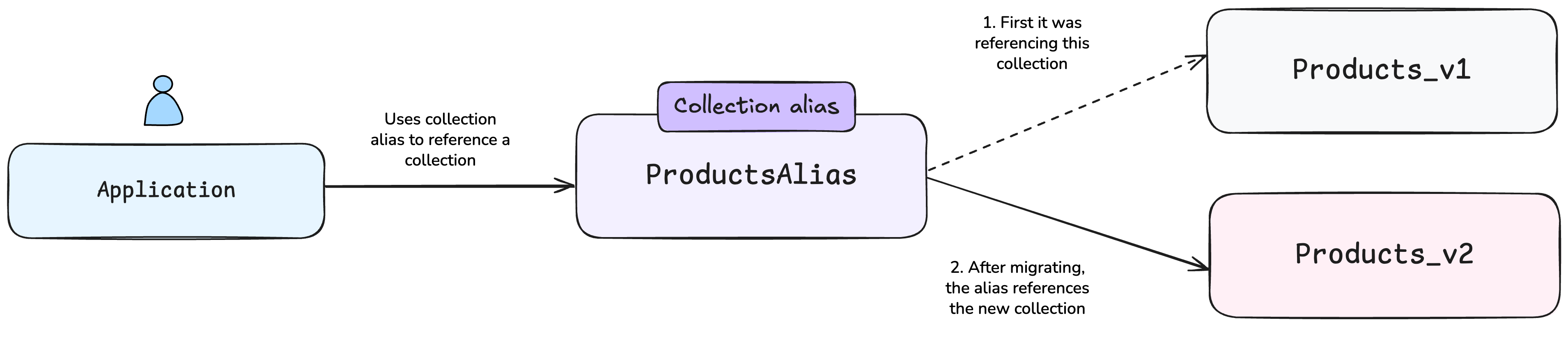
Collection aliases are ideal for schema migrations (updating properties or vectorization settings), A/B testing, and disaster recovery. They add minimal routing overhead and enable instant switching between collection versions without code changes.
Weaviate automatically routes alias requests to the target collection for object-related operations. You can use aliases wherever collection names are required for:
How aliases enable zero-downtime migration
Aliases allow you to keep your application code unchanged as it references the stable alias name. You can switch between collections instantly and roll back quickly if needed.
The migration process becomes:
- Create a new collection with updated schema
- Migrate data (while the old collection serves traffic)
- Update the alias to point to the new collection (instant switch)
- Delete the old collection after verification
Tutorial: Migrating a products collection
Let's walk through a complete migration scenario where we need to add a new field to an existing collection of products.
Step 1: Connect to Weaviate
First, connect to your Weaviate instance using your preferred client library.

client = weaviate.connect_to_local()
const client: WeaviateClient = await weaviate.connectToLocal()
config := weaviate.Config{
Scheme: "http",
Host: "localhost:8080",
}
client, err := weaviate.NewClient(config)
require.NoError(t, err)
client = WeaviateClient.connectToLocal();
String scheme = "http";
String host = "localhost";
String port = "8080";
Config config = new Config(scheme, host + ":" + port);
client = new WeaviateClient(config);
client = await Connect.Local();
Step 2: Create the original collection
Let's create our initial products collection and populate it with data.
client.collections.create(
name="Products_v1", vector_config=wvc.config.Configure.Vectors.self_provided()
)
products_v1 = client.collections.use("Products_v1")
products_v1.data.insert_many(
[{"name": "Product A", "price": 100}, {"name": "Product B", "price": 200}]
)
await client.collections.create({
name: "Products_v1",
vectorizers: weaviate.configure.vectors.selfProvided()
})
const products_v1 = client.collections.use("Products_v1")
await products_v1.data.insertMany([
{ "name": "Product A", "price": 100 },
{ "name": "Product B", "price": 200 }
])
err := client.Schema().ClassCreator().WithClass(&models.Class{
Class: "Products_v1",
Vectorizer: "none",
}).Do(ctx)
require.NoError(t, err)
objects := []*models.Object{
{
Class: "Products_v1",
Properties: map[string]interface{}{
"name": "Product A",
"price": 100,
},
},
{
Class: "Products_v1",
Properties: map[string]interface{}{
"name": "Product B",
"price": 200,
},
},
}
_, err = client.Batch().ObjectsBatcher().
WithObjects(objects...).
Do(ctx)
require.NoError(t, err)
client.collections.create("Products_v1", col -> col.vectorConfig(VectorConfig.selfProvided())
.properties(Property.text("name"), Property.number("price")));
var productsV1 = client.collections.use("Products_v1");
productsV1.data.insertMany(Map.of("name", "Product A", "price", 100.0),
Map.of("name", "Product B", "price", 200.0));
WeaviateClass productsV1 = WeaviateClass.builder()
.className("Products_v1")
.build();
client.schema().classCreator()
.withClass(productsV1)
.run();
List<WeaviateObject> products = Arrays.asList(
WeaviateObject.builder()
.className("Products_v1")
.properties(new HashMap<String, Object>() {
{
put("name", "Product A");
put("price", 100);
}
})
.build(),
WeaviateObject.builder()
.className("Products_v1")
.properties(new HashMap<String, Object>() {
{
put("name", "Product B");
put("price", 200);
}
})
.build());
client.batch().objectsBatcher()
.withObjects(products.toArray(new WeaviateObject[0]))
.run();
await client.Collections.Create(
new CollectionCreateParams
{
Name = ProductsV1,
VectorConfig = Configure.Vector("default", v => v.Text2VecTransformers()),
}
);
var productsV1 = client.Collections.Use(ProductsV1);
await productsV1.Data.InsertMany(
new[]
{
new { name = "Product A", price = 100 },
new { name = "Product B", price = 200 },
}
);
Step 3: Create an alias for production access
Now create an alias that your application will use. This decouples your application code from the specific collection version.
client.alias.create(alias_name="ProductsAlias", target_collection="Products_v1")
await client.alias.create({
alias: "ProductsAlias",
collection: "Products_v1"
})
err = client.Alias().AliasCreator().WithAlias(&alias.Alias{
Alias: "Products",
Class: "Products_v1",
}).Do(ctx)
require.NoError(t, err)
client.alias.create("Products_v1", "ProductsAlias");
client.alias().creator()
.withClassName("Products_v1")
.withAlias("Products")
.run();
await client.Alias.Create(ProductsAlias, ProductsV1);
Step 4: Use the alias in your application
Your application code should reference the alias, not the underlying collection. This ensures it continues working regardless of which collection version is active.
products = client.collections.use("ProductsAlias")
products.data.insert({"name": "Product C", "price": 300})
results = products.query.fetch_objects(limit=5)
for obj in results.objects:
print(f"Product: {obj.properties['name']}, Price: ${obj.properties['price']}")
const prods = client.collections.use("ProductsAlias");
await prods.data.insert({ name: "Product C", price: 300 });
const res = await prods.query.fetchObjects({ limit: 5 });
for (const obj of res.objects) {
console.log(`Product: ${obj.properties.name}, Price: $${obj.properties.price}`);
}
_, err = client.Data().Creator().WithClassName("Products").WithProperties(map[string]interface{}{
"name": "Product C",
"price": 300,
}).Do(ctx)
require.NoError(t, err)
resp, err := client.Data().ObjectsGetter().WithClassName("Products").WithLimit(5).Do(ctx)
require.NoError(t, err)
for _, obj := range resp {
props := obj.Properties.(map[string]interface{})
t.Logf("Product: %v, Price: $%v", props["name"], props["price"])
}
CollectionHandle<Map<String, Object>> products = client.collections.use("ProductsAlias");
products.data.insert(Map.of("name", "Product C", "price", 300.0));
var results = products.query.fetchObjects(q -> q.limit(5));
for (var obj : results.objects()) {
System.out.printf("Product: %s, Price: $%.2f\n", obj.properties().get("name"),
obj.properties().get("price"));
}
Result<WeaviateObject> insertResult = client.data().creator()
.withClassName("Products")
.withProperties(new HashMap<String, Object>() {{
put("name", "Product C");
put("price", 300);
}})
.run();
Result<List<WeaviateObject>> queryResult = client.data().objectsGetter()
.withClassName("Products")
.withLimit(5)
.run();
List<WeaviateObject> results = queryResult.getResult();
for (WeaviateObject obj : results) {
Map<String, Object> props = obj.getProperties();
System.out.println("Product: " + props.get("name") + ", Price: $" + props.get("price"));
}
var products = client.Collections.Use(ProductsAlias);
await products.Data.Insert(new { name = "Product C", price = 300 });
var results = await products.Query.FetchObjects(limit: 5);
foreach (var obj in results.Objects)
{
Console.WriteLine(
$"Product: {obj.Properties["name"]}, Price: ${obj.Properties["price"]}"
);
}
The key point is that your application code doesn't need to know whether it's accessing Products_v1 or Products_v2 - it just uses the stable alias name.
Step 5: Create the new collection with updated schema
Now let's create a new version of the collection with an additional field (e.g., adding a category property).
client.collections.create(
name="Products_v2",
vector_config=wvc.config.Configure.Vectors.self_provided(),
properties=[
wvc.config.Property(name="name", data_type=wvc.config.DataType.TEXT),
wvc.config.Property(name="price", data_type=wvc.config.DataType.NUMBER),
wvc.config.Property(
name="category", data_type=wvc.config.DataType.TEXT
),
],
)
await client.collections.create({
name: "Products_v2",
vectorizers: weaviate.configure.vectors.selfProvided(),
properties: [
{ name: "name", dataType: weaviate.configure.dataType.TEXT },
{ name: "price", dataType: weaviate.configure.dataType.NUMBER },
{ name: "category", dataType: weaviate.configure.dataType.TEXT },
],
})
err = client.Schema().ClassCreator().WithClass(&models.Class{
Class: "Products_v2",
Vectorizer: "none",
Properties: []*models.Property{
{Name: "name", DataType: schema.DataTypeText.PropString()},
{Name: "price", DataType: schema.DataTypeNumber.PropString()},
{Name: "category", DataType: schema.DataTypeText.PropString()},
},
}).Do(ctx)
require.NoError(t, err)
client.collections.create("Products_v2", col -> col.vectorConfig(VectorConfig.selfProvided())
.properties(Property.text("name"), Property.number("price"), Property.text("category")
));
WeaviateClass productsV2 = WeaviateClass.builder()
.className("Products_v2")
.properties(Arrays.asList(
Property.builder()
.name("name")
.dataType(Arrays.asList(DataType.TEXT))
.build(),
Property.builder()
.name("price")
.dataType(Arrays.asList(DataType.NUMBER))
.build(),
Property.builder()
.name("category")
.dataType(Arrays.asList(DataType.TEXT))
.build()
))
.build();
client.schema().classCreator()
.withClass(productsV2)
.run();
await client.Collections.Create(
new CollectionCreateParams
{
Name = ProductsV2,
VectorConfig = Configure.Vector("default", v => v.SelfProvided()),
Properties =
[
Property.Text("name"),
Property.Number("price"),
Property.Text("category"),
],
}
);
Step 6: Migrate data to the new collection
Copy data from the old collection to the new one, adding default values for new fields or transforming data as needed.
products_v2 = client.collections.use("Products_v2")
old_data = products_v1.query.fetch_objects().objects
for obj in old_data:
products_v2.data.insert(
{
"name": obj.properties["name"],
"price": obj.properties["price"],
"category": "General",
}
)
const products_v2 = client.collections.use("Products_v2")
const oldData = (await products_v1.query.fetchObjects()).objects
for (const obj of oldData) {
await products_v2.data.insert({
"name": obj.properties["name"],
"price": obj.properties["price"],
"category": "General",
})
}
oldData, err := client.Data().ObjectsGetter().
WithClassName("Products_v1").
Do(ctx)
require.NoError(t, err)
for _, obj := range oldData {
props := obj.Properties.(map[string]interface{})
_, err = client.Data().Creator().
WithClassName("Products_v2").
WithProperties(map[string]interface{}{
"name": props["name"],
"price": props["price"],
"category": "General",
}).Do(ctx)
require.NoError(t, err)
}
var productsV2 = client.collections.use("Products_v2");
var oldData = productsV1.query.fetchObjects(c -> c.limit(10)).objects();
List<Map<String, Object>> migratedObjects = new ArrayList<>();
for (var obj : oldData) {
migratedObjects.add(Map.of("name", obj.properties().get("name"), "price",
obj.properties().get("price"), "category", "General"
));
}
productsV2.data.insertMany(migratedObjects.toArray(new Map[0]));
Result<GraphQLResponse> oldDataResult = client.graphQL()
.get()
.withClassName("Products_v1")
.withFields(
Field.builder().name("name").build(),
Field.builder().name("price").build(),
Field.builder().name("_additional").fields(
Field.builder().name("id").build()).build())
.run();
if (oldDataResult.getResult() != null) {
Map<String, Object> data = (Map<String, Object>) oldDataResult.getResult().getData();
Map<String, Object> get = (Map<String, Object>) data.get("Get");
List<Map<String, Object>> oldProducts = (List<Map<String, Object>>) get.get("Products_v1");
List<WeaviateObject> newProducts = new java.util.ArrayList<>();
for (Map<String, Object> obj : oldProducts) {
WeaviateObject newProduct = WeaviateObject.builder()
.className("Products_v2")
.properties(new HashMap<String, Object>() {
{
put("name", obj.get("name"));
put("price", obj.get("price"));
put("category", "General");
}
})
.build();
newProducts.add(newProduct);
}
client.batch().objectsBatcher()
.withObjects(newProducts.toArray(new WeaviateObject[0]))
.run();
}
var productsV2 = client.Collections.Use(ProductsV2);
var oldData = (await productsV1.Query.FetchObjects()).Objects;
foreach (var obj in oldData)
{
await productsV2.Data.Insert(
new
{
name = obj.Properties["name"].ToString(),
price = Convert.ToDouble(obj.Properties["price"].ToString()),
category = "General",
}
);
}
Step 7: Update the alias (instant switch)
This is the magic moment - update the alias to point to the new collection. This switch is instantaneous, and all queries using the ProductsAlias alias now access the new collection.
client.alias.update(alias_name="ProductsAlias", new_target_collection="Products_v2")
products = client.collections.use("ProductsAlias")
result = products.query.fetch_objects(limit=1)
print(result.objects[0].properties)
await client.alias.update({
alias: "ProductsAlias",
newTargetCollection: "Products_v2"
})
const products = client.collections.use("ProductsAlias")
const result = await products.query.fetchObjects({ limit: 1 })
console.log(result.objects[0].properties)
err = client.Alias().AliasUpdater().WithAlias(&alias.Alias{
Alias: "Products",
Class: "Products_v2",
}).Do(ctx)
require.NoError(t, err)
result, err := client.Data().ObjectsGetter().
WithClassName("Products").
WithLimit(1).
Do(ctx)
require.NoError(t, err)
if len(result) > 0 {
fmt.Printf("%v\n", result[0].Properties)
}
client.alias.update("ProductsAlias", "Products_v2");
products = client.collections.use("ProductsAlias");
var result = products.query.fetchObjects(q -> q.limit(1));
System.out.println(result.objects().get(0).properties());
client.alias().updater()
.withAlias("Products")
.withNewClassName("Products_v2")
.run();
Result<GraphQLResponse> result = client.graphQL()
.get()
.withClassName("Products")
.withFields(
Field.builder().name("name").build(),
Field.builder().name("price").build(),
Field.builder().name("category").build())
.withLimit(1)
.run();
if (result.getResult() != null) {
Map<String, Object> data = (Map<String, Object>) result.getResult().getData();
Map<String, Object> get = (Map<String, Object>) data.get("Get");
List<Map<String, Object>> products_data = (List<Map<String, Object>>) get.get("Products");
System.out.println(products_data.get(0));
}
await client.Alias.Update(aliasName: ProductsAlias, targetCollection: ProductsV2);
products = client.Collections.Use(ProductsAlias);
var result = await products.Query.FetchObjects(limit: 1);
Console.WriteLine(JsonSerializer.Serialize(result.Objects.First().Properties));
Step 8: Verify and clean up
After verifying that everything works correctly with the new collection, you can safely delete the old one.
client.collections.delete("Products_v1")
await client.collections.delete("Products_v1")
err = client.Schema().ClassDeleter().WithClassName("Products_v1").Do(ctx)
client.collections.delete("Products_v1");
client.schema().classDeleter()
.withClassName("Products_v1")
.run();
await client.Collections.Delete(ProductsV1);
Summary
This tutorial demonstrated how to use collection aliases in Weaviate for zero-downtime migrations. Key takeaways:
- Aliases are pointers to collections that enable instant switching between versions
- Zero downtime is achieved by preparing the new collection while the old one serves traffic
- Application code remains unchanged when using aliases instead of direct collection names
- Rollback is simple - just point the alias back to the previous collection
Collection aliases are essential for production Weaviate deployments where uptime is critical. They enable confident migrations, A/B testing, and flexible deployment strategies without service interruption.
Further resources
Questions and feedback
If you have any questions or feedback, let us know in the user forum.