

Manage tenant states & temperature

Storage resources are grouped into tiers. Each tier has different performance characteristics and costs:
| Tier | Location | Speed | Cost |
|---|---|---|---|
| Hot | RAM | Fastest access | Most expensive |
| Warm | Disk | Medium speed | Medium price |
| Cold | Cloud Storage | Slowest access | Least expensive |
The pricing difference between Hot and Cold tiers is significant. Cloud storage is several orders of magnitude cheaper than RAM.
In multi-tenant collections, you can change tenant states (Active, Inactive, Offloaded) to move data between storage tiers. This allows granular trade-offs between cost, resource availability, and readiness.
Manage vector index resource temperature
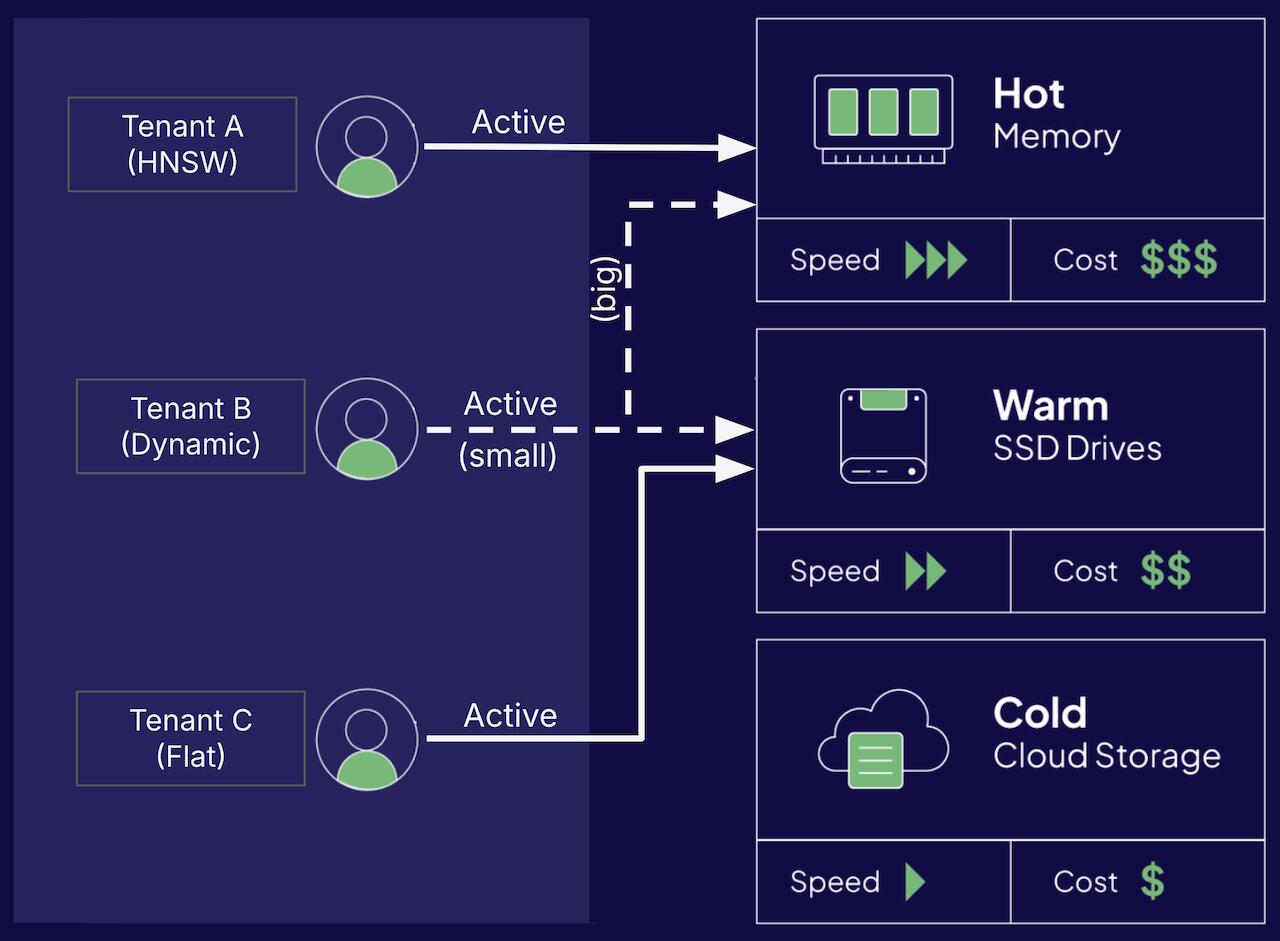
The vector index type affects its default resource type.
HNSWindex (default) - uses the vector index in RAM, a Hot resource.Flatindex - uses the vector index on disk, a Warm resource.Dynamicindex - starts as a flat index (using a Warm resource), then switches to an HNSW index (a Hot resource) at a predetermined threshold.
Tenant States Overview
There are three tenant states: Active, Inactive and Offloaded.
| Tenant state | CRUD & Queries | Vector Index | Inverted Index | Object Data | Time to Activate | Description |
|---|---|---|---|---|---|---|
| Active (default) | Yes | Hot/Warm | Warm | Warm | None | Tenant is available for use |
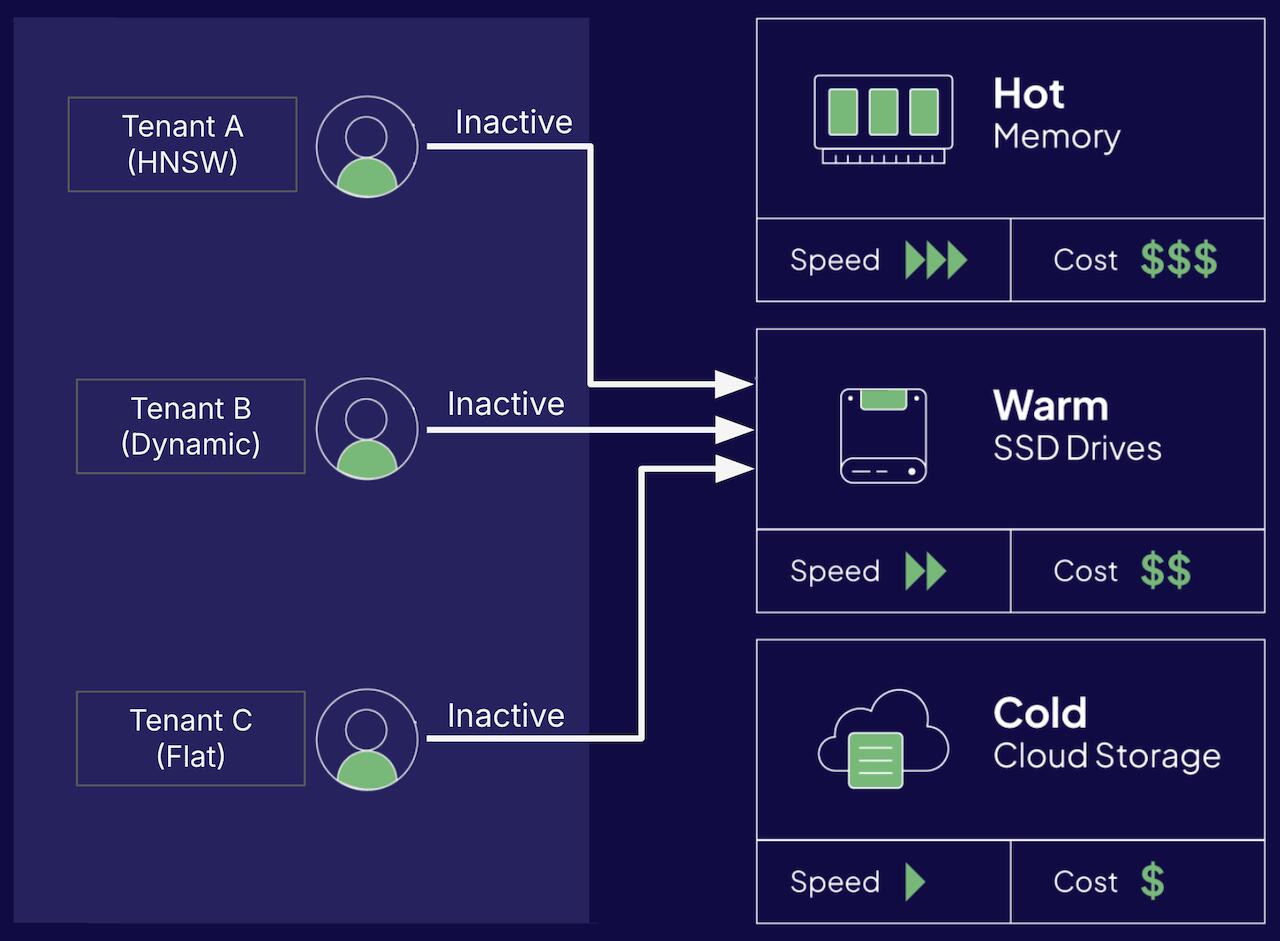
| Inactive | No | Warm | Warm | Warm | Fast | Tenant is locally stored but not available for use |
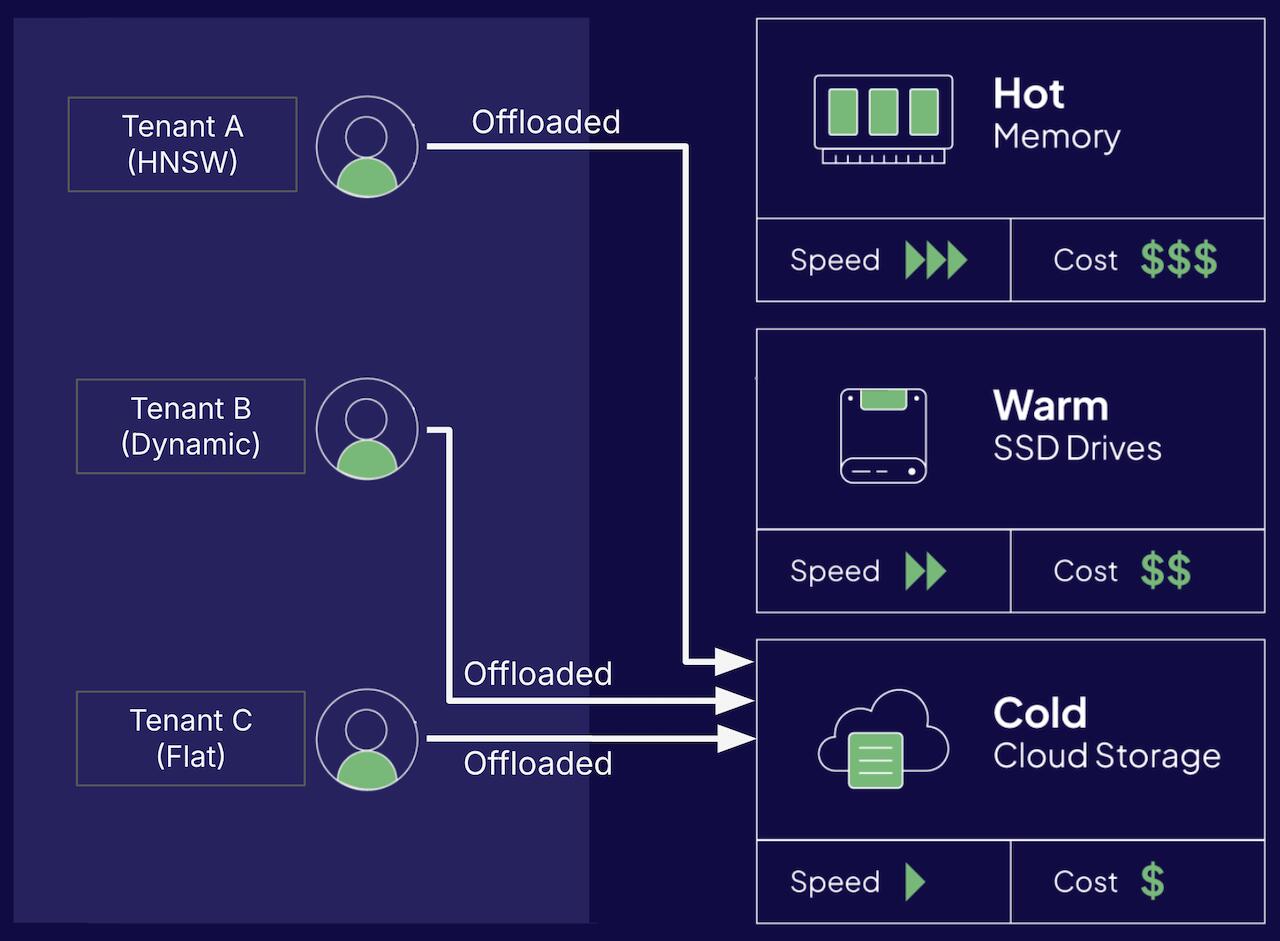
| Offloaded | No | Cold | Cold | Cold | Slow | Tenant is stored in cloud storage and not available for use |
Tenant states are eventually consistent. Read more
Active
An Active tenant is available for queries and CRUD operations. Depending on the vector index type it uses either hot or warm resources.
The tenant's object data and inverted index are stored on disk, using warm resources.
Inactive
An Inactive tenant is not available for queries nor CRUD operations.
The tenant's object data, vector index and inverted index are stored on disk, using warm resources. This can lower Weaviate's memory requirements compared to active tenants that use hot resources.
Since the tenant is stored locally, inactive tenants can be activated quickly.
Offloaded
As of Weaviate v1.26.0, tenants can only be offloaded to cold storage in AWS S3. Additional storage options may be added in future releases.
To offload a tenant, use the offload-s3 module.
An offloaded tenant is not available for queries or CRUD operations.
The tenant's object data, vector index and inverted index are stored on the cloud, using cold resources. Since the tenant is stored remotely, there is a delay when activating an offloaded tenant.
Activate tenant
To activate an INACTIVE tenant from disk, or to onload and activate an OFFLOADED tenant from cloud, call:
 API docs
If a snippet doesn't work or you have feedback, please open a GitHub issue.
from weaviate.classes.tenants import Tenant, TenantActivityStatus

multi_collection = client.collections.use("MultiTenancyCollection")
multi_collection.tenants.update(tenants=[
    Tenant(
        name="tenantA",
        activity_status=TenantActivityStatus.ACTIVE
    )
])
Deactivate tenant
To deactivate an ACTIVE tenant, or to onload an OFFLOADED tenant from cloud (without activating it), call:
API docsIf a snippet doesn't work or you have feedback, please open a GitHub issue.
from weaviate.classes.tenants import Tenant, TenantActivityStatus

multi_collection = client.collections.use("MultiTenancyCollection")
multi_collection.tenants.update(tenants=[
    Tenant(
        name="tenantA",
        activity_status=TenantActivityStatus.INACTIVE
    )
])
Offload tenant
To offload an ACTIVE or INACTIVE tenant to cloud, call:
API docsIf a snippet doesn't work or you have feedback, please open a GitHub issue.
from weaviate.classes.tenants import Tenant, TenantActivityStatus

multi_collection = client.collections.use("MultiTenancyCollection")
multi_collection.tenants.update(tenants=[
    Tenant(
        name="tenantA",
        activity_status=TenantActivityStatus.OFFLOADED
    )
])
Tenant offloading requires an Offload module.
To enable tenant offloading, see the modules page
Automatically activate tenants
Enable this to automatically activate INACTIVE or OFFLOADED tenants if a search, read, update, or delete operation is performed on them.
Activation is the only automatic state change. Weaviate never deactivates or offloads a tenant on its own: there is no idle timeout, no usage-based policy, and no background process that moves a tenant to INACTIVE or OFFLOADED. A tenant stays ACTIVE, and keeps using its resources, until you change its state.
To reclaim resources on a schedule, run your own job. A common pattern is a daily job that lists the collection's tenants, selects the ones your application has not used within your chosen window, and then calls Deactivate tenant or Offload tenant for them in one batched update. Track last use in your own application, and pair the job with autoTenantActivation so that a tenant that becomes active again is brought back on the next request.
API docsIf a snippet doesn't work or you have feedback, please open a GitHub issue.
from weaviate.classes.config import Configure

multi_collection = client.collections.create(
    name="CollectionWithAutoTenantActivation",
    multi_tenancy_config=Configure.multi_tenancy(
        enabled=True,
        auto_tenant_activation=True  # Enable automatic tenant activation
    )
)
Questions and feedback
Have a question or feedback? Here's how to reach us.