

TwelveLabs Multimodal Embeddings with Weaviate
Weaviate's integration with TwelveLabs' APIs allows you to access their models' capabilities directly from Weaviate.
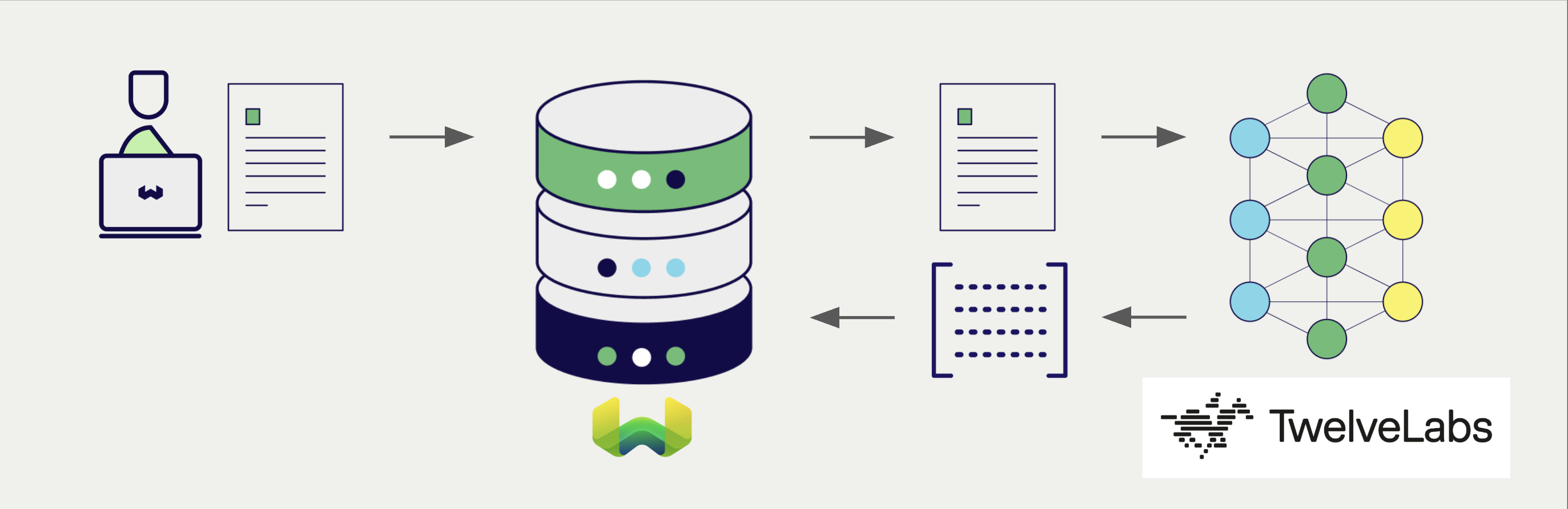
Configure a Weaviate vector index to use a TwelveLabs embedding model, and Weaviate will generate embeddings for various operations using the specified model and your TwelveLabs API key. This feature is called the vectorizer.
At import time, Weaviate generates multimodal object embeddings and saves them into the index. For vector and hybrid search operations, Weaviate converts text queries into embeddings. Multimodal search operations are also supported.
TwelveLabs is best known for video understanding, but this integration vectorizes text and images only. Video and audio are not supported.
The vectorizer reads only the textFields and imageFields settings, and only nearText and nearImage search operations are available. Weaviate stores a videoFields entry if you add one to a collection definition, but nothing reads it, so it has no effect.
Requirements
Weaviate configuration
Your Weaviate instance must be configured with the TwelveLabs vectorizer integration (multi2vec-twelvelabs) module.
v1.38.9This integration is available in Weaviate v1.38.9, v1.39.0 and later.
For Weaviate Cloud (WCD) users
This integration is enabled by default on Weaviate Cloud (WCD) instances.
For self-hosted users
- Check the cluster metadata to verify if the module is enabled.
- Follow the how-to configure modules guide to enable the module in Weaviate.
API credentials
You must provide a valid TwelveLabs API key to Weaviate for this integration. Go to TwelveLabs to sign up and obtain an API key.
Provide the API key to Weaviate using one of the following methods:
- Set the
TWELVELABS_APIKEYenvironment variable that is available to Weaviate. - Provide the API key at runtime, as shown in the examples below.
 API docs
If a snippet doesn't work or you have feedback, please open a GitHub issue.
import weaviate
from weaviate.classes.init import Auth
import os

# Recommended: save sensitive data as environment variables
twelvelabs_key = os.getenv("TWELVELABS_APIKEY")
headers = {
    "X-Twelvelabs-Api-Key": twelvelabs_key,
    "X-Twelvelabs-Baseurl": "https://api.twelvelabs.io/v1.3",  # Optional; for providing a custom base URL
}

client = weaviate.connect_to_weaviate_cloud(
    cluster_url=weaviate_url,                       # `weaviate_url`: your Weaviate URL
    auth_credentials=Auth.api_key(weaviate_key),      # `weaviate_key`: your Weaviate API key
    headers=headers
)

# Work with Weaviate

client.close()
The X-Twelvelabs-Baseurl header is optional. It overrides the base URL that is set in the collection definition for the duration of the request.
Configure the vectorizer
Configure a Weaviate index as follows to use a TwelveLabs embedding model.
Name the properties that hold your text in textFields, and the properties that hold your base64 encoded images in imageFields. Set at least one of the two. A collection that names no fields cannot produce a vector, and inserts into it fail with a more than one embedding found for object error.
API docsIf a snippet doesn't work or you have feedback, please open a GitHub issue.
from weaviate.classes.config import Configure, DataType, Multi2VecField, Property

client.collections.create(
    "DemoCollection",
    properties=[
        Property(name="title", data_type=DataType.TEXT),
        Property(name="poster", data_type=DataType.BLOB),
    ],
    vector_config=[
        Configure.Vectors.multi2vec_twelvelabs(
            name="title_vector",
            # Define the fields to be used for the vectorization - using image_fields, text_fields
            image_fields=[
                Multi2VecField(name="poster", weight=0.9)
            ],
            text_fields=[
                Multi2VecField(name="title", weight=0.1)
            ],
        )
    ],
    # Additional parameters not shown
)
A typed configuration API for this integration is currently available in the Python client only. If Configure.Vectors.multi2vec_twelvelabs is missing from your installation, upgrade to the latest Python client version.
With any other client library, configure the vectorizer by sending the collection definition as shown in the cURL example above, or by passing the equivalent module configuration map that your client accepts. Data import and search operations are not specific to this integration and work with every client library.
Select a model
You can specify one of the available models for the vectorizer to use, as shown in the following configuration example.
API docsIf a snippet doesn't work or you have feedback, please open a GitHub issue.
from weaviate.classes.config import Configure, DataType, Multi2VecField, Property

client.collections.create(
    "DemoCollection",
    properties=[
        Property(name="title", data_type=DataType.TEXT),
        Property(name="poster", data_type=DataType.BLOB),
    ],
    vector_config=[
        Configure.Vectors.multi2vec_twelvelabs(
            name="title_vector",
            model="marengo3.0",
            # Define the fields to be used for the vectorization - using image_fields, text_fields
            image_fields=[
                Multi2VecField(name="poster", weight=0.9)
            ],
            text_fields=[
                Multi2VecField(name="title", weight=0.1)
            ],
        )
    ],
    # Additional parameters not shown
)
You can specify one of the available models for Weaviate to use. The default model is used if no model is specified.
Vectorization behavior
Weaviate follows the collection configuration and a set of predetermined rules to vectorize objects.
Unless specified otherwise in the collection definition, the default behavior is to:
- Only vectorize properties that use the
textortext[]data type (unless skipped) - Sort properties in alphabetical (a-z) order before concatenating values
- If
vectorizePropertyNameistrue(falseby default) prepend the property name to each property value - Join the (prepended) property values with spaces
- Prepend the collection name if
vectorizeClassNameistrue(the default differs by integration — check this page's parameter table)
Since v1.27, the string is sent to the model as is. Earlier versions lowercase it first, and you can restore that behavior with the LOWERCASE_VECTORIZATION_INPUT environment variable.
Vectorizer parameters
The following examples show how to configure TwelveLabs-specific options.
API docsIf a snippet doesn't work or you have feedback, please open a GitHub issue.
from weaviate.classes.config import Configure, DataType, Multi2VecField, Property

client.collections.create(
    "DemoCollection",
    properties=[
        Property(name="title", data_type=DataType.TEXT),
        Property(name="poster", data_type=DataType.BLOB),
    ],
    vector_config=[
        Configure.Vectors.multi2vec_twelvelabs(
            name="title_vector",
            # Define the fields to be used for the vectorization - using image_fields, text_fields
            image_fields=[
                Multi2VecField(name="poster", weight=0.9)
            ],
            text_fields=[
                Multi2VecField(name="title", weight=0.1)
            ],
            # Further options
            # model="marengo3.0",
            # base_url="https://api.twelvelabs.io/v1.3",
        )
    ],
    # Additional parameters not shown
)
The collection definition accepts the following settings:
| Setting | Description |
|---|---|
textFields | Names of the text and text[] properties to vectorize. Each element of a text[] property is vectorized separately. |
imageFields | Names of the properties that hold base64 encoded images, typically blob properties. A text[] property listed here is ignored. |
weights | Relative weights for combining the field vectors, given as textFields and imageFields arrays. Each array must have the same number of entries as the field list it weights. The weights are normalized so that they sum to 1. If no weights are set, all fields are weighted equally. |
model | The model to use. The default is marengo3.0. |
baseURL | The base URL of the TwelveLabs API. The default is https://api.twelvelabs.io/v1.3. |
In the Python client, these settings are named text_fields, image_fields, model and base_url. Weights are set per field with Multi2VecField(name=..., weight=...).
Weaviate writes a vectorizeClassName setting into every collection that uses this integration, but this integration does not read it. Its value does not change the vectors that are produced, and the collection name is never included in the vectorized text.
The per-property skip and vectorizePropertyName settings also have no effect here. Property selection is determined only by textFields and imageFields membership, and property names are never vectorized.
For further details on model parameters, see the TwelveLabs documentation.
Data import
After configuring the vectorizer, import data into Weaviate. Weaviate generates embeddings for text and image objects using the specified model.
Provide image data as a base64 encoded string. A data:<mediatype>;base64, prefix is accepted and stripped before decoding. A property that is listed in imageFields but does not hold valid base64 data fails the import with a decode base64 image error.
API docsIf a snippet doesn't work or you have feedback, please open a GitHub issue.
collection = client.collections.use("DemoCollection")

with collection.batch.fixed_size(batch_size=200) as batch:
    for src_obj in source_objects:
        poster_b64 = url_to_base64(src_obj["poster_path"])
        weaviate_obj = {
            "title": src_obj["title"],
            "poster": poster_b64  # Add the image in base64 encoding
        }

        # The model provider integration will automatically vectorize the object
        batch.add_object(
            properties=weaviate_obj,
            # vector=vector  # Optionally provide a pre-obtained vector
        )
Weaviate does not throttle its requests to TwelveLabs for this integration, and it does not read rate limit response headers. It sends one request per text value and one request per image, and it processes batches of ten objects in parallel, so a large import can produce a high request rate.
If TwelveLabs rejects a request, the error surfaces as a failed import for that object and is not retried. Pace large imports from the client side, for example by importing in smaller batches.
If you already have a compatible model vector available, you can provide it directly to Weaviate. This can be useful if you have already generated embeddings using the same model and want to use them in Weaviate, such as when migrating data from another system.
Searches
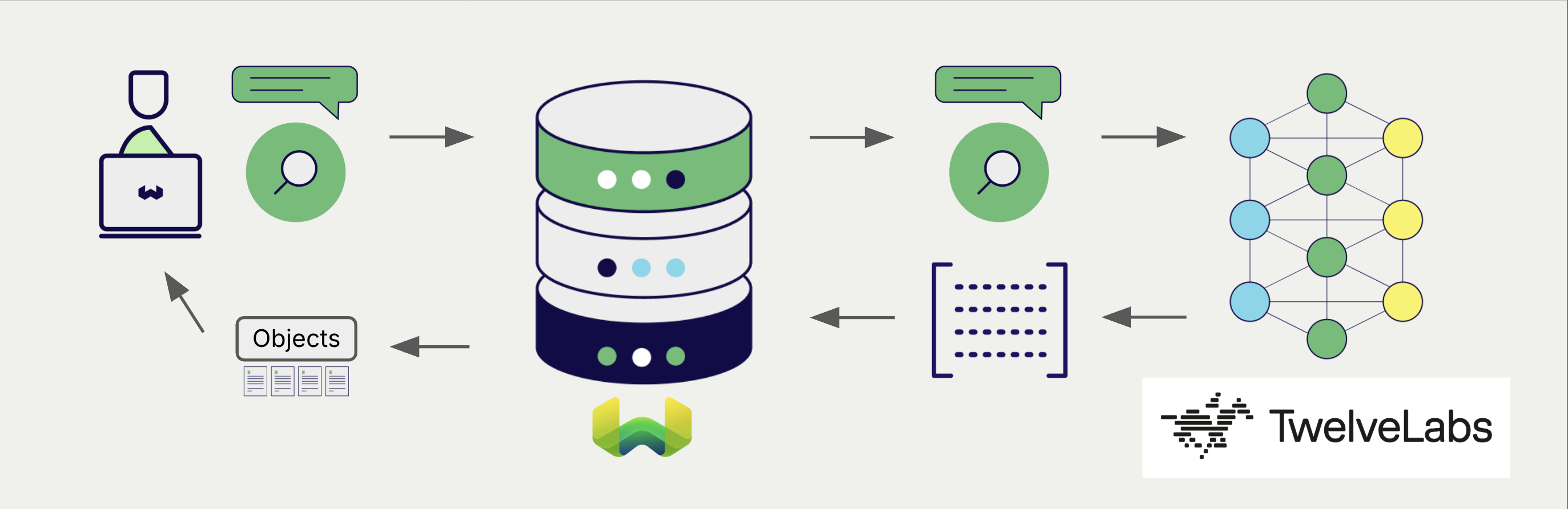
Once the vectorizer is configured, Weaviate will perform vector and hybrid search operations using the specified TwelveLabs model.
The examples below use the Python client. Search operations are not specific to this integration, so see the How-to: Query & Search guides for the equivalent examples in the other client libraries.
Vector (near text) search
When you perform a vector search, Weaviate converts the text query into an embedding using the specified model and returns the most similar objects from the database.
The query below returns the n most similar objects from the database, set by limit.
API docsIf a snippet doesn't work or you have feedback, please open a GitHub issue.
collection = client.collections.use("DemoCollection")

response = collection.query.near_text(
    query="A holiday film",  # The model provider integration will automatically vectorize the query
    limit=2
)

for obj in response.objects:
    print(obj.properties["title"])
Hybrid search
A hybrid search performs a vector search and a keyword (BM25) search, before combining the results to return the best matching objects from the database.
When you perform a hybrid search, Weaviate converts the text query into an embedding using the specified model and returns the best scoring objects from the database.
The query below returns the n best scoring objects from the database, set by limit.
API docsIf a snippet doesn't work or you have feedback, please open a GitHub issue.
collection = client.collections.use("DemoCollection")

response = collection.query.hybrid(
    query="A holiday film",  # The model provider integration will automatically vectorize the query
    limit=2
)

for obj in response.objects:
    print(obj.properties["title"])
Vector (near image) search
When you perform a near image search, Weaviate converts the query into an embedding using the specified model and returns the most similar objects from the database.
To perform a near image search, convert the image query into a base64 string and pass it to the search query.
The query below returns the n most similar objects to the input image from the database, set by limit.
API docsIf a snippet doesn't work or you have feedback, please open a GitHub issue.
def url_to_base64(url):
    import requests
    import base64

    image_response = requests.get(url)
    content = image_response.content
    return base64.b64encode(content).decode("utf-8")


collection = client.collections.use("DemoCollection")

query_b64 = url_to_base64(src_img_path)

response = collection.query.near_image(
    near_image=query_b64,
    limit=2,
    return_properties=["title", "release_date", "tmdb_id", "poster"]  # To include the poster property in the response (`blob` properties are not returned by default)
)

for obj in response.objects:
    print(obj.properties["title"])
References
Available models
The default model is marengo3.0, which produces 512-dimensional vectors.
Weaviate does not validate the model name, so you can set any model that the TwelveLabs embedding endpoint accepts for your account. Weaviate does not publish the list of accepted names; see the TwelveLabs documentation on creating embeddings for the models that are currently available.
Further resources
Code examples
Once the integrations are configured at the collection, the data management and search operations in Weaviate work identically to any other collection. See the following model-agnostic examples:
- The How-to: Manage collections and How-to: Manage objects guides show how to perform data operations (i.e. create, read, update, delete collections and objects within them).
- The How-to: Query & Search guides show how to perform search operations (i.e. vector, keyword, hybrid) as well as retrieval augmented generation.
External resources
Questions and feedback
Have a question or feedback? Here's how to reach us.