

Morph Embeddings with Weaviate
Weaviate's integration with Morph's API lets you access Morph-hosted embedding models directly from Weaviate.
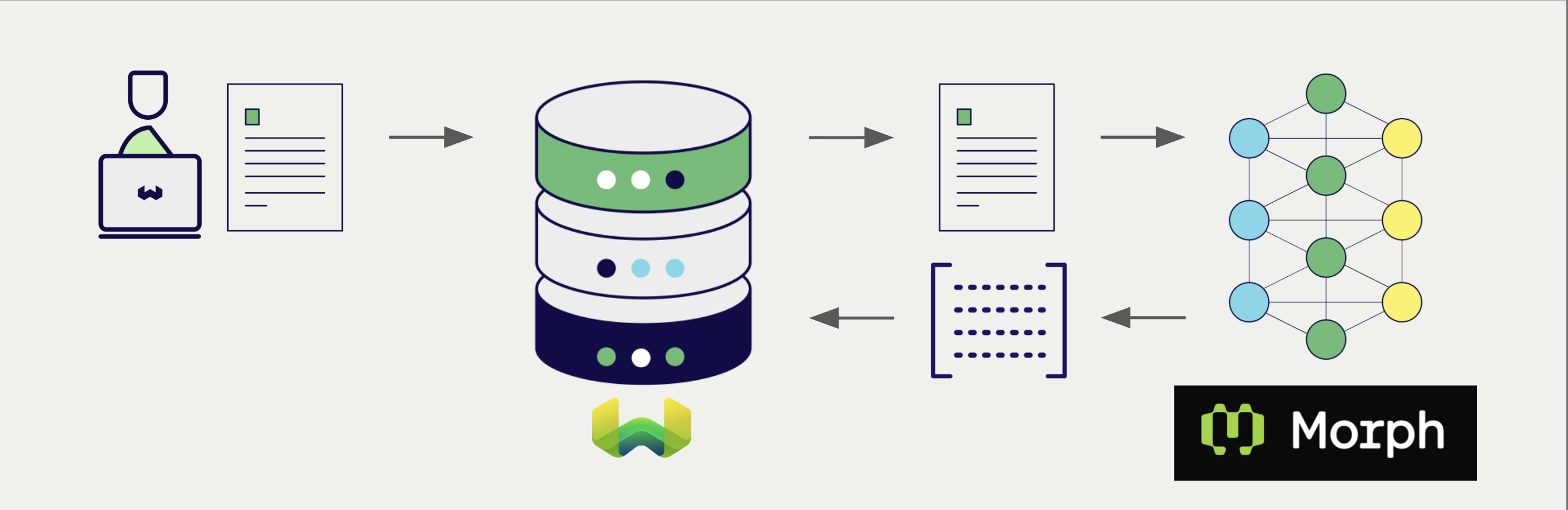
Configure a Weaviate vector index to use a Morph embedding model, and Weaviate generates embeddings for imports and searches automatically using your Morph API key. This is the vectorizer.
At import time, Weaviate generates text object embeddings and saves them into the index. For vector and hybrid search operations, Weaviate converts text queries into embeddings.
Morph's own documentation labels the Embedding API as legacy and planned for deprecation. Check the current status in Morph's documentation before you build on this integration.
Requirements
Weaviate configuration
Your Weaviate instance must have the text2vec-morph module enabled. The module is available in Weaviate v1.32.6 and later.
For Weaviate Cloud (WCD) users
This integration is enabled by default on Weaviate Cloud (WCD) instances.
For self-hosted users
- Check the cluster metadata to verify if the module is enabled.
- Follow the how-to configure modules guide to enable the module in Weaviate.
API credentials
You must provide a Morph API key to Weaviate for this integration. Generate one in the Morph dashboard and supply it via one of:
- Set the
MORPH_APIKEYenvironment variable on the Weaviate server. - Provide the
X-Openai-Api-Keyheader at request time, as shown below.
Weaviate builds Morph requests with its OpenAI-compatible client, so the request header is X-Openai-Api-Key. There is no Morph-specific header. A key provided in the header takes precedence over the server environment variable.
When no key is available, Weaviate reports:
no api key found neither in request header: X-Openai-Api-Key nor in environment variable under OPENAI_APIKEY
The header name in that message is correct, but the environment variable name is not. This integration reads MORPH_APIKEY. Setting OPENAI_APIKEY does not make it work.
 API docs
If a snippet doesn't work or you have feedback, please open a GitHub issue.
import weaviate
from weaviate.classes.init import Auth
import os

# Recommended: save sensitive data as environment variables
morph_key = os.getenv("MORPH_APIKEY")
headers = {
    # Morph requests are built by Weaviate's OpenAI-compatible client,
    # so the Morph key is supplied under the OpenAI header name.
    "X-Openai-Api-Key": morph_key,
}

client = weaviate.connect_to_weaviate_cloud(
    cluster_url=weaviate_url,                       # `weaviate_url`: your Weaviate URL
    auth_credentials=Auth.api_key(weaviate_key),      # `weaviate_key`: your Weaviate API key
    headers=headers
)

# Work with Weaviate

client.close()
X-Openai-Api-Key is also the header for the OpenAI integration. A single request therefore cannot carry different keys for the two integrations. If you use both in the same instance, set the server environment variables instead so each integration gets its own key.
Configure the vectorizer
Configure a Weaviate index to use a Morph embedding model by setting the vectorizer as follows:
API docsIf a snippet doesn't work or you have feedback, please open a GitHub issue.
from weaviate.classes.config import Configure

client.collections.create(
    "DemoCollection",
    vector_config=[
        Configure.Vectors.text2vec_morph(
            name="title_vector",
            source_properties=["title"],
        )
    ],
    # Additional parameters not shown
)
Vectorization behavior
Weaviate follows the collection configuration and a set of predetermined rules to vectorize objects.
Unless specified otherwise in the collection definition, the default behavior is to:
- Only vectorize properties that use the
textortext[]data type (unless skipped) - Sort properties in alphabetical (a-z) order before concatenating values
- If
vectorizePropertyNameistrue(falseby default) prepend the property name to each property value - Join the (prepended) property values with spaces
- Prepend the collection name if
vectorizeClassNameistrue(the default differs by integration — check this page's parameter table)
Since v1.27, the string is sent to the model as is. Earlier versions lowercase it first, and you can restore that behavior with the LOWERCASE_VECTORIZATION_INPUT environment variable.
Vectorizer parameters
model: The Morph model id. Defaults tomorph-embedding-v3.baseURL: The base URL prefix that requests are sent to. Any existing path is preserved whenendpointis appended. Defaults tohttps://api.morphllm.com.endpoint: The API path that Weaviate appends to the base URL. Defaults to/v1/embeddings. Set it if the service you target uses a different path.
For how Weaviate combines baseURL and endpoint into a request URL, see Header parameters.
endpoint availabilityAdded in v1.38.2 (backported to v1.36.19 and v1.37.10).
Weaviate stores baseURL and model in the collection configuration even when you do not set them, because the module supplies a default for each. endpoint is different: it appears in the stored configuration only when you set it explicitly. If you read a collection back and see no endpoint, the default path applies.
No dimensions parameter is sent, so the embedding dimension is always the model's native size.
Example configuration
The following examples set the Morph-specific options. Client libraries do not all expose the same options, so each example shows what that client supports.
API docsIf a snippet doesn't work or you have feedback, please open a GitHub issue.
from weaviate.classes.config import Configure

client.collections.create(
    "DemoCollection",
    vector_config=[
        Configure.Vectors.text2vec_morph(
            name="title_vector",
            source_properties=["title"],
            model="morph-embedding-v3",
            base_url="https://api.morphllm.com",  # Base URL; an existing path is preserved
            endpoint="/v1/embeddings",            # Path appended to the base URL
        )
    ],
    # Additional parameters not shown
)
Header parameters
You can provide the API key and the base URL at runtime through headers. Headers provided at request time take precedence over the collection configuration and over the server environment variable:
X-Openai-Api-Key: The Morph API key for this request.X-Openai-Baseurl: The base URL to use instead of the default.
Provide the headers as shown in the API credentials examples above.
Weaviate builds the request URL by appending the endpoint path (/v1/embeddings by default) to the base URL. The base URL supplies the scheme and host; endpoint supplies only the path. A value in endpoint cannot redirect requests to a different host.
If a base URL already carries a path, that path is kept and the endpoint path is appended to it.
There is no header that overrides endpoint. Set it in the collection configuration.
Because Weaviate uses its OpenAI-compatible client for this integration, upstream failures are reported as connection to: OpenAI API failed with status: ... even when the request was sent to Morph.
Data import
After configuring the vectorizer, import data into Weaviate. Weaviate generates embeddings for text objects using the configured model.
If you already have a compatible model vector available, you can provide it directly to Weaviate. This can be useful if you have already generated embeddings using the same model and want to use them in Weaviate, such as when migrating data from another system.
Searches
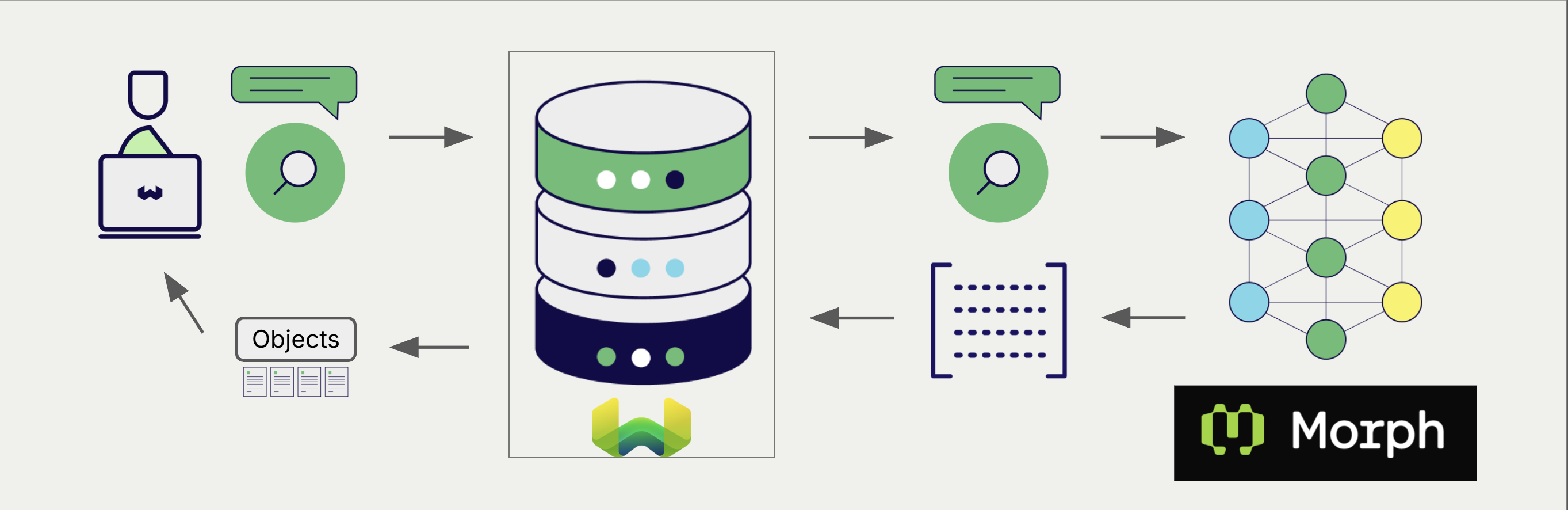
Once the vectorizer is configured, Weaviate performs vector and hybrid searches using the specified Morph model.
Vector (near text) search
When you perform a vector search, Weaviate converts the text query into an embedding using the configured Morph model and returns the most similar objects.
Hybrid search
When you perform a hybrid search, Weaviate fuses keyword and vector ranking. The text query is embedded with the configured Morph model; the keyword side uses Weaviate's inverted index.
References
Available models
Weaviate does not restrict which model id you can set, so any model the Morph API accepts can be used. morph-embedding-v3 is the default. Morph's list models endpoint returns the model ids your key can use. Check it before you rely on a model id, as availability and dimensions can change.
Further resources
Other integrations
Code examples
Once the vectorizer is configured, Weaviate handles model inference transparently. The standard client library how-tos apply unchanged. No Morph-specific code is required at query or import time beyond the configuration shown above.
Questions and feedback
Have a question or feedback? Here's how to reach us.