

Multi-Data center
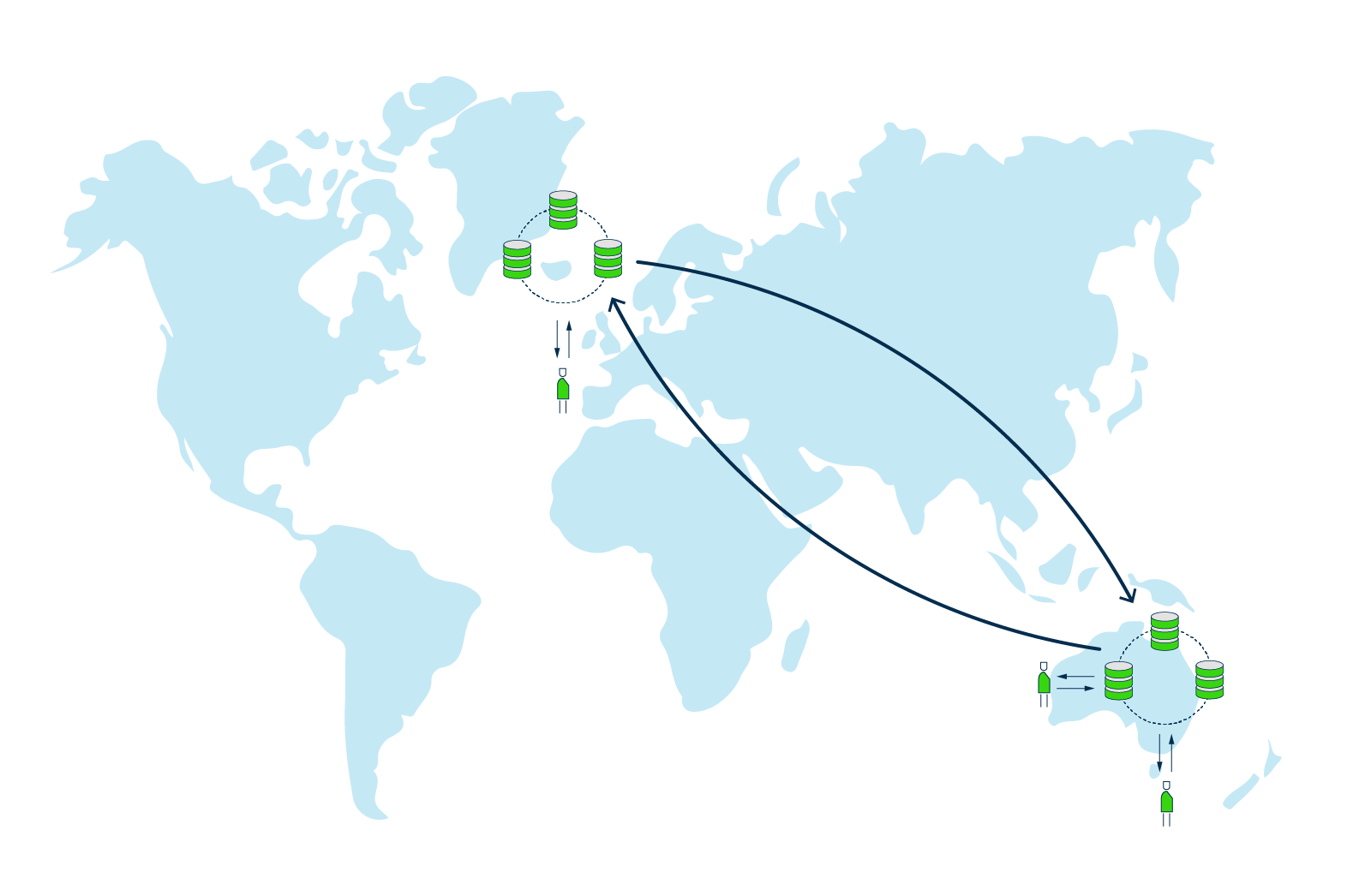
Multi-Data center (Multi-DC) replication enables you to have multiple copies of the data on multiple servers across more than one data center. Weaviate supports running a single cluster across multiple data centers (since v1.31), so you can place nodes in different geographic regions for lower latency and keep your data redundant across locations.
Multi-DC replication is beneficial if you have user groups spread over different geographical locations (e.g. Iceland and Australia). When you place nodes in different local regions of user groups, latency can be decreased. Multi-DC replication also comes with the additional benefit that data is redundant on more physical locations, which means that in the rare case of an entire data center going down, data can still be served from another location.
If all replica nodes are in the same data center, network requests between nodes are cheap and fast, but the whole deployment is at risk if that data center goes down. Spreading a cluster's nodes across data centers removes this single point of failure, so your data remains available even if an entire data center becomes unreachable.
To run a cluster across data centers, tune Weaviate's inter-node networking for the higher-latency, lower-reliability links between regions. See Running a single cluster across data centers (WAN) below.
Running a single cluster across data centers (WAN)
Weaviate can operate a single cluster across data centers (a wide-area network, or WAN) by adjusting its inter-node communication for high-latency, lower-reliability links.
Enabling WAN mode
Set the CLUSTER_ADVERTISE_ADDR environment variable to enable WAN mode. When it is set, Weaviate switches its internal memberlist configuration to DefaultWANConfig, which increases timeouts and relaxes failure-detection thresholds so they are suitable for cross-data center communication.
Key environment variables
| Variable | Description | Required |
|---|---|---|
CLUSTER_ADVERTISE_ADDR | The public IP address that other nodes should use to reach this node. Setting this enables WAN mode. Must be a valid IP address (hostnames are rejected). | Yes (for WAN) |
CLUSTER_ADVERTISE_PORT | The port to advertise to other nodes. If not set, it defaults to CLUSTER_GOSSIP_BIND_PORT. If set, it must be between 1024 and 65535. | No |
CLUSTER_BIND_ADDR | The local address to bind to. Defaults to 0.0.0.0. | No |
CLUSTER_GOSSIP_BIND_PORT | The port used for gossip (memberlist) traffic. Defaults to 7946. | No |
CLUSTER_DATA_BIND_PORT | The port used for data traffic. Defaults to CLUSTER_GOSSIP_BIND_PORT + 1. | No |
CLUSTER_JOIN | A comma-separated list of host:port addresses of existing cluster members to join. | Yes (for joining) |
Example configuration
Below is an example environment configuration for a node intended to participate in a cross-data center cluster:
environment:
  - CLUSTER_HOSTNAME=weaviate-0
  - CLUSTER_ADVERTISE_ADDR=203.0.113.10 # Public IP of this node
  - CLUSTER_JOIN=203.0.113.20:7946 # Public IP:Port of a node in another DC
  - CLUSTER_BIND_ADDR=0.0.0.0 # Optional; this is already the default bind address
  - CLUSTER_GOSSIP_BIND_PORT=7946
  - CLUSTER_DATA_BIND_PORT=7947
  - RAFT_BOOTSTRAP_EXPECT=3 # Use an odd number > 1 across DCs for faster, more reliable elections
  - RAFT_JOIN=203.0.113.20:8300 # Join an existing Raft voter (default Raft port is 8300)
Notes
- Latency: Cross-data center operations inherently have higher latency. Make sure your application timeouts account for this.
- Security: Gossip and data traffic are not encrypted by default. For cross-data center communication over the public internet, use a VPN or other secure tunnel, or make sure
CLUSTER_ADVERTISE_ADDRis only reachable over a private network (for example, VPC peering).
Questions and feedback
Have a question or feedback? Here's how to reach us.